Release Notes
Stay up to date with the latest changes and improvements to n8v.
November 13, 2026
Features
- Gemini 4 Hydrogen: Prepared for an owner-only rollout, off by default. Google's coding model adds Low, Medium, High and Extra high effort to the Gemini picker; High is the default. It supports native Google keys and verified compatible endpoints. Standard rates are $1.50 per million input tokens, $0.075 for cached input and $7.50 for output including thinking. Existing Gemini models remain available. Preview opt-in does not enable Hydrogen.
November 11, 2026
Features
- Repository instructions: Being rolled out. Tell every agent on a repository the same rules once. On a repository's page under Environments, Instructions holds two Markdown texts: standing instructions that lead the first message of every new chat there, and Fast Forward instructions that follow your saved prompt each time you fast-forward a chat. Your account has a default for the standing text in Settings, General, and one chat can have its own override. A preview beside the editor shows what is sent as you type. The Fast-Forward button shows the composed message once before it sends. Every change is a version with who made it and when, and agents also find the texts in
~/.n8v/instructions.md. Assistants read and change them withget_instructionsandset_instructions, or leave a proposal you confirm in the app, andfast_forwardtakesdry_run; the API has/api/v1/instructionsand/api/v1/repos/{owner}/{repo}/instructions. See Repository instructions.
November 10, 2026
Features
-
Integrations: Being rolled out. A new Integrations page with a catalog of services, any remote MCP server by its address, and one place to decide what your assistants may do with each. Every tool is classed as read, write, spend or cannot be undone, with a rule for when it asks you first; anything that moves money always asks. Anything that must ask waits under Needs you with exactly what will run and what it costs; approving is done only by you, in the app, and runs it once. See Integrations.
-
Integrations for assistants:
list_connectorsshows each tool's class, when it asks and the connection's health, andcall_connectorcan prepare a call, commit it and carry an idempotency key. New tools read a connector, tighten its access, follow an action and decline one, each with a REST twin under/api/v1/connectors. No tool or endpoint approves. -
Assistant journal: Available for account activation. Settings > Journal shows what connected assistants did and why, with sessions, actions and individual calls. New conversations can use
journal_catch_upto pick up earlier work. Six MCP tools and matching API routes share the same account-scoped history. See The assistant journal. -
Gemini 4 Carbon: Prepared for owner verification, with availability off. Adds Low, Medium and High reasoning for difficult coding tasks, alongside Argon, with paid Google API and compatible endpoint support. See Gemini for pricing and runtime limits.
-
Model capabilities: Being rolled out. Each model now has a score per aspect: coding, agentic work, reasoning, creative writing, video, context window, speed and cost. Every number names its source and date, a model nobody measured says no data, and nothing is averaged across sources. The numbers come from LMArena and OpenRouter each day, and from Artificial Analysis once its key is set. The model picker shows a badge such as "1st coding", and a new Models page has one table per aspect. Assistants get
recommend_model(a ranked shortlist for a kind of work that also checks which subscriptions have room),model_capabilities, and acapabilitiesdetail onlist_models; the API hasGET /api/v1/model-capabilitiesand/recommend. See Model capabilities. -
Limits per model: Being rolled out. On a Claude subscription Fable can run out while Opus still runs; n8v used to hold out the whole subscription for an hour. Now only that model is held out there. Its chats run on another subscription you opted in for auto-switch, or, with Continue on another model on in Settings, Agent, on the model you chose for it (Fable on Opus 5.5 by default) at the same effort, and return once their own model has room. The Quota page names the model that is out and when it is asked again. Assistants read it in
subscriptionsand set the rule withset_model_fallback. See Limits and fallback per model. -
Quota planning: See billing renewal, recent pace and allowance likely to expire unused in the Quota page's Plan section. Assistants can read the same view with
quota_planand record a billing date withset_renewal. Unknown readings stay unknown, and billing renewal is kept separate from quota reset. See Quota. -
Ask n8v what a connection may do: A connected assistant can call
whoami, and a keyGET /api/v1/me, to read every tool and connector with whether it may be used and, if not, why and what fixes it: a switch that is off, a permission not granted, a connector that needs a new sign-in, the plan, or read-only. It also gives the rate limits and the organizations and repositories in reach, and needs no permission. In Settings, API, open What it can do under any key or connected app to read the same list. See What an assistant can read. -
Read a repository without starting a chat: With the Read files permission, an assistant or a key reads a repository's README, docs index and top level in one call (
repo_overview), its files and folders with size and last commit (repo_tree), and a file by lines (repo_file). Over the API underGET /api/v1/repos/{owner}/{repo}. Read-only. Environment files, keys and credentials are never returned. See Repository structure. -
Read a repository's history:
repo_commitslists commits by branch, path, author or date with how much each changed,repo_committhe files one commit changed,repo_branchesandrepo_tagsits branches and tags, andrepo_pullsits pull requests by state with reviews, checks, merge state and the chat that opened each. No diffs. Try: "What merged in the app repository this week, and which chats did it?" See Repository history. -
Your switch: Settings, API, Reading repositories turns this on or off for your account. It is on by default. Reads are cached and capped at 40 units a minute and 400 an hour per key or app, and n8v keeps part of the GitHub budget for your agents. See Limits and caching.
-
In early access:
- Artifacts: Keep what your assistants make in one place. An assistant publishes an HTML page or a small package (HTML, CSS, JavaScript, images, fonts, data; at most 100 files, 2 MB a file and 3 MB a version) to n8v with
artifact_publish, and a script does the same withPOST /api/v1/artifacts. Every publish is a new version you can open, compare and download on the Artifacts page. A page runs in an isolated frame on a site of its own, so it reaches nothing of your n8v account, and every file is scanned for secrets before it is stored. See Artifacts. - Share an artifact: An artifact is private until you share it with its organization, or by a link behind a sign-in that can name email addresses, end on a date and be revoked at once.
- Hand an artifact to your agents: Start a chat with up to 5 artifacts, over the API or with
start_chat. Each is unpacked read-only in the agent environment, and the agent can publish what it makes of it as the next version. Organization agents read and update their organization's artifacts and never share them. - Two new permissions: Read artifacts (
artifacts:read) and Publish artifacts (artifacts:write), for API keys and for connected assistants, with seven tools and/api/v1/artifacts. Every call is in your activity log. See Artifacts in the API.
- Artifacts: Keep what your assistants make in one place. An assistant publishes an HTML page or a small package (HTML, CSS, JavaScript, images, fonts, data; at most 100 files, 2 MB a file and 3 MB a version) to n8v with
UX Improvements & Bug Fixes
- A connected assistant now has exactly the permissions you approved for it, on every connection. Before, a sign-in made before you approved more kept its older, narrower permissions, so tools such as creating an organization could be missing on one device and present on another. Approve a permission once at the consent screen and every connection of that app has it; nothing to reconnect per device.
- Limit recovery: Being rolled out. At a provider limit a chat now tries your other opted-in subscriptions of the same provider before any other provider, only moves to a fallback that has room, and waits for the first reset instead of stopping in an error. It returns to its own model as soon as its provider has room, and continues by itself when you switch or opt in a subscription. The Quota page says when the only subscription with room has auto-switch off, and warns before the active one fills. See Quota.
November 9, 2026
Features
- Claude Fable 5.2: Being rolled out. Anthropic's newest most-capable model, released today, runs with the Claude Code agent as Fable 5.2, with the Low to Max effort ladder for accounts that have effort levels enabled. It costs a fifth less than Fable 5.1 ($8 per million input tokens and $40 per million output tokens, with $0.20 prompt-cache reads). At X-High and Max effort it can start subagents to review its own work, which raises what a task costs. Switching a chat between Fable 5.1 and 5.2 starts a fresh Claude session, since Fable 5.1 cannot read 5.2's reasoning. Fable 5.1 and Fable 5 remain available.
November 8, 2026
Features
- Agents wait without keeping an agent environment running: Being rolled out. Agents get a
wait_fortool to wait for GitHub checks, a deploy URL, or a wake URL a CI or deploy step calls, then end their turn. The chat shows what it waits for, its agent environment pauses, and n8v resumes the agent with the result or at its deadline. See Waiting on CI and deploys. - No more silent finishes: Being rolled out. When an agent's turn ends while a background task, monitor or process it started is still running, the chat shows Ended with work still running with what was left and an Ask the agent to finish it button, and the API and MCP report it as
pendingWork. - Background tasks finish, and the agent carries on with their results: Being rolled out. When Claude starts a task in the background, such as a test run or a build, its session stays open until the task ends, so the task is no longer stopped with the turn and Claude continues in the same chat with what it produced. A session waits at most 50 minutes.
- See why a chat waits: A waiting chat now says why, above its composer: all your agent environment slots are in use and where it is in line, a named subscription reached its usage limit and when it resets, it waits for a free agent environment, its own turn is still running, or it is scheduled. Positions and countdowns stay current while you watch. See Queue, fork and restart.
- Manage queued messages: Messages you send while a chat works now show the model each will run on. Edit one in place, remove it, move it up or down, or clear them all.
- Fork or restart a chat: From a chat's menu, Fork starts a new chat from its first message and a summary of its work, on a branch from its latest checkpoint. Restart starts the same task again on a fresh agent environment and the same branch, for a chat whose agent environment broke, and archives the old one. Either can use another model and take a note on what to do differently. Both chats link to each other.
- The same over the API and MCP:
GET /api/v1/chats/{id}/queue, edits under/queue, andPOST /api/v1/chats/{id}/forkand/restart; over MCP,read_queue,edit_queueandfork_chat. Every call is in your activity log. See Why a chat waits, and its queue and Fork or restart a chat. - Your switch: Settings, API, Queue turns all of this on or off for your account, in the app too. It is on by default.
- Set up your organizations from a conversation: An assistant connected to n8v can now create organizations, rename and describe them, give them the context every agent should know, set their monthly and daily caps, archive or restore them, and hide the ones you do not use from your sidebar while they keep running. It hires agents with their instructions, model, budget and schedule, changes who reports to whom, and sets goals. Over the API too, with the new Manage organizations permission. See Manage organizations.
- See what an agent knows:
read_agentandGET /api/v1/organizations/{org}/agents/{agent}show an agent's own instructions, its organization's context and the exact instructions it runs with. - Your connectors, for your assistant, only as you choose: With the new Use your connectors permission, an assistant can call connectors you connected in n8v, such as a Gmail mailbox. Every connector starts off. Turning one on in Settings, API, Connectors for assistants allows only the tools known to just read; tick any other tool yourself. Pointing a connector at another server, or disconnecting it, turns it off again. Every call is in your activity log. See Connectors.
- Hide an organization: In an organization's Settings, under In your sidebar, switch it off. It folds away under Hidden at the end of your sidebar and keeps working; only you stop seeing it.
- Gemini 4 Argon: Google's new flagship model runs with the Gemini agent in Low, Medium, and High reasoning. Pick Gemini 4 Argon in the model selector. It runs on n8v credits at Google's list price, $2 per million input tokens and $10 per million output tokens through November 30, 2026, and $4 and $20 after that. It also runs through your own compatible endpoint, such as CLIProxy, when that endpoint's Google key is on a paid tier.
- Agent environments are now agent environments: Every agent runs in its own isolated agent environment, and everything you read in n8v now says so: the counter, the settings, the docs, the emails, the iOS app and what an assistant reads over the API and MCP. Nothing you built breaks: API paths, error codes and MCP tool names keep their spelling.
GET /api/v1/agent-environmentsis the clearer name forGET /api/v1/sandboxes, which still works and is deprecated. See Agent environments. - See how many agent environments you run, of how many: Under your task list, Agent environments 12/20 · 2 queued shows how many of your tasks run at once, your limit and how many wait their turn. Hover it for what it counts. A task over your limit is not refused: it says it waits for a free agent environment, with the numbers, and starts as soon as one finishes. The same count is
GET /api/v1/agent-environmentsand the MCP toolsandboxes. - Pull request and CI status for every chat: Ask a connected assistant "what merged today, and is it live?" or "which pull requests fail CI?". Every chat over the API and MCP now says whether its pull request is open, a draft, merged or closed, whether CI passes, whether it has conflicts, and whether the change is on main and live in production.
GET /api/v1/chats/{id}/pull-requestand the MCP toolpull_request_statusgive one in full: the review, every check with the link to its log, the commit on main and each production environment. See Pull request and CI. - Find chats by their pull request: The chat list over the API and MCP filters by pull request state, CI state and conflicts, and by when the pull request merged:
GET /api/v1/chats?dateField=merged&from=2026-11-08, orlist_chatswithpr_state,checks,conflictsanddate_fieldmerged. See List chats. - Your switch: Settings, API, Reading chats, Pull requests and CI turns this on or off for your account. It is on by default. It reads GitHub through the n8v GitHub App, read-only; where the app may not read checks or deployments yet, the answer says so and where to approve it.
- Organize chats with tags and topics from your assistant: Ask a connected assistant to "tag the chats that failed this week as urgent" or "put every billing chat under the Payments topic". Over MCP,
update_chatadds and removes tags and sets a chat's topic,bulk_chatstags, untags or sets the topic of up to 50 chats at once, andlist_chatsfilters by tags and topic and shows each chat's.list_tags,create_tag,update_taganddelete_tag, and the same for topics, manage them with the app's own rules. Over the API:PATCH /api/v1/chats/{id},POST /api/v1/chats/bulk,GET /api/v1/chats?tags=bug&topic=Payments,/api/v1/tagsand/api/v1/topics. Open tabs of the app show each change at once. See Tags and topics. - Never lose an agent's work: While an agent works, n8v now saves its uncommitted and untracked changes every few minutes, at the first file edit and at the end of every turn, to a hidden ref of your repository (
refs/n8v/wip/{chat id}/{sandbox id}), never to your branch's history. Work in a public repository is saved at the end of each turn only, as before. The chat's branch exists on GitHub from that first edit. An agent environment that runs out of memory and cannot be resumed no longer takes the work with it. - Agent environment health in every chat: A small dot next to the branch shows the chat's agent environment at a glance, and says a word when it needs you: could not be resumed, resuming, memory or disk nearly full, or work not saved. Open it for memory and disk, the last save with its link on GitHub, and the last error and when.
- Recover a chat in one press: From the same place, Retry resume tries again with backoff and continues the chat once it is back; Rebuild gives the chat a fresh agent environment, optionally a larger one, from its last save (brought onto the branch if it moved on since, and kept on GitHub if it cannot be) and continues it with its whole conversation; Export saves what an agent environment that can still be read holds and downloads it as a patch.
- Over the API and MCP:
GET /api/v1/chats/{id}/sandboxandPOST .../sandbox/resume,/rebuildand/export, and the MCP toolssandbox_health,resume_sandbox,rebuild_sandboxandexport_work, with the same scopes, activity log and limits as the rest of the API. See Agent environment health and recovery. - Your switch: Settings, General, Save work in progress turns this on or off for your account. It is on by default.
- Subscription limits from your assistant: See connected subscriptions and keys, quota windows, resets and chats waiting on a provider limit in Settings > API,
GET /api/v1/subscriptionsor the MCP toolsubscriptions. Private labels such as "Claude #2" keep account emails and identifiers out of API and MCP responses. Missing or stale quota stays explicit. - Continue with another model: Ask for an available alternative, then use
update_chatto set the next-turn model. Supported provider changes check credentials first and explain the transcript handoff. The subscription overview and model-switch setting is on by default; cross-provider access still follows the existing provider-switch flag. - Quota, redesigned: The Quota page (formerly Limits) now shows every subscription and key at a glance: provider, account, plan, health (available, limit reached, needs re-login), the 5-hour and weekly windows with countdowns to their reset, and the models each serves. Hover or open an account for every window with exact figures and absolute reset times, the model each window limits, and its recent events. Subscriptions of one provider are also shown as one combined total, weighted by plan, as in the iOS app. See Quota.
- Switch in one step: Use makes any healthy subscription the active one for its provider, with Undo. When chats are running or waiting on a limit, it first says what happens to them: they finish the turn on the old account and use the new one from their next message. Pick the default model on the same page.
- Auto-switch you can see: Opt each Claude or OpenAI subscription in to take over when another one hits a limit. The page shows the order they are tried in (most headroom first) and which are held out until their reset. Every limit hit, switch and settings change is in Recent activity and in Settings, API, Activity.
- The same powers for your assistant:
POST /api/v1/subscriptions/active,/auto-switchand/default-model,GET /api/v1/subscriptions/events, and the MCP toolsswitch_subscription,set_auto_switch,set_default_modelandsubscription_events. Subscriptions are named by private labels such as "Claude #2". The iOS app's/limitsanswer carries the same health, order and models. See Switch and steer subscriptions.
UX Improvements & Bug Fixes
- A chat no longer shows Monitoring, with its agent environment kept running, for a background task Claude had already stopped when its turn ended.
- The consent screen offers Approve for you, Manage your organizations and Use your connectors as switches of their own, each off until you turn it on. To give an assistant you already connected the new permissions, connect it again.
- Agents run on your own API keys: Claude on your Anthropic API key, Codex and Gemini on your OpenAI or Google key or on n8v credits. Adding a credential now asks for an API key. Claude and ChatGPT subscriptions are no longer offered, in line with Anthropic's terms; ones you already connected keep working. See Claude Code and OpenAI Codex.
- Founding Edition seats give their credit in euros. €50 is booked as $56.13 at the ECB rate of €1 = $1.1225, and Settings, Billing shows the euro amount and the rate on the grant.
- Typing a card's link without its code (
n8v.nl/i) now opens the page that asks for the code, instead of a missing page. - Admins set how many agent environments each tier (trial, Core, Pro, admins) and each account runs at once under Admin, Agent environment limits, without a deploy; every change is recorded with who made it. Admin, Active Agent Environments shows agent environment hours and provider cost per day, tier, repository and account, with a month-end projection.
- Admins see what each account and tier costs n8v and earns under Admin, Cost and margin: agent environments, models on n8v credits and n8v's own calls such as dictation and titles, against revenue, with the margin at list price for trials and Founding Edition seats and a month-end projection. The rates used are listed on the page.
- Plans now state the concurrent tasks each one runs by default: 3 on Core, 15 on Pro.
- An agent environment rebuilt to recover a chat says so in the chat, with how many saved files came back, instead of saying it sat idle.
- Recovery actions taken in the app appear in Settings, API, Activity, marked Web.
- Accounts you are not using show the age of their last reading instead of an alert, since they are read every 15 minutes.
- n8v can now change its look for everyone at once, without an update. Until it does, n8v looks exactly as it does today. Every new look meets WCAG 2.2 AA contrast in light and dark, and your light, dark or system choice in Settings stays yours.
November 7, 2026
Features
- Search what was said in your chats: An assistant connected to n8v, or a script with an API key, can now find a prompt you sent or a decision an agent made in any chat, not only in chat titles. Search covers your messages and the agents' replies, newest first, with filters for author, chat, repository, organization, dates and archived chats. Use
GET /api/v1/search/messagesover the API orsearch_messagesover MCP. See Search messages. - Read long chats light, open one step in full: Read only your own messages or only the agent's final summary of each turn with
onlyonGET /api/v1/chats/{id}/messagesand on the MCP toolread_chat. Open one message or tool call with its full output by id withGET /api/v1/chats/{id}/messages/{messageId}or the MCP toolread_message. See Read messages. - What you spent, and on what, over the API and MCP: Ask a connected assistant "what did I spend this week, and on what?".
GET /api/v1/usageand the MCP toolusageanswer with what your agents' work cost at list price, what n8v took from your credits, tokens, agent time and turns, by model, chat, organization, automation, repository, agent, day, week or month, compared with the period before. See Usage and spend. - Your Stats page over the API and MCP:
GET /api/v1/statsand the MCP toolstatsread the numbers the Stats page shows: tasks, pull requests merged, agent time and tokens, per day and compared with the days before. - One switch in Settings: Settings, API, Usage and statistics turns both on or off for your account. It is on by default.
- Find any chat in one call: The chat list over the API and MCP now filters by status (
error,complete,running,needs_youand more), date range, organization and automation, so an assistant asked "what failed this week" answers at once instead of paging. Over the API:GET /api/v1/chats?status=error&from=2026-11-02; over MCP:list_chats. See List chats. - Tidy up from a conversation: Rename a chat, pin or unpin it, mark it read or unread, or change the model its next messages run on, with
PATCH /api/v1/chats/{id}or the MCP toolupdate_chat. Archive, restore, mark read or unread, or stop up to 50 chats at once withPOST /api/v1/chats/bulkorbulk_chats; each chat answers on its own. See Change a chat's settings and Act on many chats. - Automations from your assistant: Ask Claude, ChatGPT or your own scripts to list, read, create, change, pause, resume, run and delete your automations, with every field the app has: the prompt, the schedule (as cron or as "every Friday at 02:00"), the model, the repository and branch, the follow-up in the same chat and when it ends. Over the API:
/api/v1/automations; over MCP:list_automations,update_automationand the rest, with the scopesautomations:readandautomations:write. See Automations over the API and MCP. - Why runs failed:
GET /api/v1/automations/{id}/runsandlist_automation_runslist each run's chat with its status and, when it failed, why, including whether it was refused for its model. - A warning when a model stops working: An automation whose model can no longer run, because your account cannot use it or because the provider refused it on the last run, now says so: on its card in Automations, and in every API and MCP answer. Creating, changing or running one with such a model is refused with the reason.
- Your switch: Settings, API, Automations turns this on or off for your account. It is on by default. An assistant connected before today asks for the new access once you connect it again; Settings, API shows which.
- Name the new branch: When you start a task, you can choose its new branch's name: the branch icon next to the branch picker in the new-task box,
newBranchNameinPOST /api/v1/chats, andnew_branch_namein the MCPstart_chattool, so an assistant can name the branch when you tell it to. The branch is created from the branch you start from, exactly as named. A taken name is refused, or gets-2,-3when you allow it. Switch it off under Settings → GitHub → Name new branches. See Name the new branch. - Prepared prompts over the API and MCP: An assistant you talk to, or any script, can now list your prepared prompts with their variables, start a chat with one on the repository, branch and model you choose, or send one into a chat, exactly as the composer does, and add, change or delete them. Over MCP:
list_prompts,start_chat_with_prompt,send_promptand more; over the API:/api/v1/prompts.{{name}}in a prompt marks a value to fill in each time. On for every account with prepared prompts; turn it off in Settings, API & MCP. See Prepared prompts. - Supervisors over the API and MCP: Assistants and API keys can now list, create, configure, pause, resume and delete your supervisors, and read what each did: every decision it made and every message it sent to a chat. A supervisor can be named by its name, so "pause the release supervisor" works by voice. Over REST:
/api/v1/supervisors; over MCP:list_supervisors,read_supervisor,supervisor_activity,create_supervisor,update_supervisor,pause_supervisor,resume_supervisoranddelete_supervisor. Connect an assistant again once to give it supervisor access, and turn it off any time under Settings, API, Supervisors. See Supervisors. - Chats that message each other: The agents in your chats can now ask each other instead of you relaying. The checkout chat asks the API chat which port it uses; a running Claude Code agent gets the question after its current step and answers within seconds, and an idle chat starts a turn for it. Each chat shows what it sent and received, and its Peers tab lists every message and where it is. A chat you stopped stays stopped. See Peer messaging.
- Connect two chats yourself: Connect a chat in the Peers tab introduces two chats with a note on what they should settle together. Over the API,
POST /api/v1/peers/connectdoes the same,POST /api/v1/chats/{id}/peerssends one chat's message to another, andGET /api/v1/peerslists the chats within reach. Over MCP:connect_chats,send_peer_messageandlist_peer_chats, so you can ask Claude or ChatGPT to connect your chats. See Peer messaging in the API. - Catch up on what happened: n8v now keeps a 30-day log of chats that finished, failed or wait for you (a plan to approve), automation runs and what your organizations ask you. An assistant connected over MCP calls
catch_upto hear what happened since it last looked, and scripts read the same events fromGET /api/v1/eventswith a cursor. See What changed: events. - Webhooks: Settings, API, Webhooks sends the events you choose to your own endpoint as they happen, in n8n, Slack or your own service. Each request is signed, failed deliveries are retried for about two days, and the delivery log shows every attempt, with a test send and Send again. Also over the API with the new
webhooks:managescope. See Webhooks.
UX Improvements & Bug Fixes
- The
chats:readscope is now called Read chats in Settings, API, as it covers reading and searching what was said. Admins can switch message search off under Reading chats in the same tab. - ChatGPT's
searchnow also returns messages that match, after the matching chats. - Clipped text in
read_chatnames the message id that shows it all. - Agent turns now record the model they ran, so usage by model includes work on your own subscriptions.
- A model set for a chat over the API or MCP is the one the chat's composer opens on in the app, and the one its replies from Telegram, GitHub mentions and organizations run on, unless they name another.
- Settings, API has a Chat controls switch: it turns the new filters, chat settings and bulk actions off for every key and assistant of your account, and on again.
- A paused scheduled automation that is resumed now waits for its next time, instead of running at once for the time it missed.
- Peer messaging is on for every account. Turn it off for yours in Settings, Agent, Peer messaging, or take one chat out in its Peers tab.
- A message you send in a chat's name reads You, as that chat, on the web and in the iOS app. The iOS app also shows another chat's message on the agent's side, with its sender, instead of as your own.
- Settings, General, Events and webhooks turns the event log and webhooks off for your account, and back on.
November 2, 2026
Features
- What runs now, everywhere: The Now board's view of your agents, each running chat's step in flight, how long its turn has run, its steps and edits and its latest line, plus what waits for you, is now one call away:
GET /api/v1/nowover the API andnowover MCP. See What runs now. - Stop, Fast-Forward and archive over the API and MCP:
POST /api/v1/chats/{id}/stop,/forwardand/archive, and the MCP toolsfast_forwardandarchive_chat, do what the buttons in the app do. - Everything you do in the app, in your activity log: Settings, API, Activity now lists what you do in the n8v app for iPhone, iPad and Mac as well: stopping, sending, Fast-Forward, archiving, queue edits and setting changes, marked iOS.
UX Improvements & Bug Fixes
- In the app, a subagent that finished no longer shows as still running.
October 31, 2026
Features
- Gemini for everyone: Gemini is available to every account and runs on n8v credits with no setup. An account with only n8v credits starts on Gemini 3.1 Pro.
- Codex on n8v credits: Codex runs GPT-5.5 on n8v credits, or on your own OpenAI API key, without a ChatGPT login.
UX Improvements & Bug Fixes
- Claude always runs on your own Claude credentials; n8v credits pay for Gemini, Codex and OpenCode. A Claude task without your own credentials now says so before it starts, instead of failing on a credit balance error.
- GPT-5.1-Codex and GPT-5.1-Codex-Max, which OpenAI's API no longer serves, are no longer offered by default. You can still turn them on under Settings → Agent.
October 28, 2026
Features
- Send again with another model: When a chat asks for a model your account cannot use, or one your provider does not serve, the card now offers Send again with the model in your composer: one press, and your message runs again exactly as you wrote it. Details says what was asked for and why. Over the API,
POST /api/v1/chats/{id}/retrydoes the same, and any Retry the app offers;GET /api/v1/chats/{id}says why a chat stopped (lastError). Over MCP:retry_chatandread_chat. See Model access.
UX Improvements & Bug Fixes
- A message sent again shows as Sent again with the model, in the chat and in the iOS app, with the time and, on hover, the model that was refused.
October 27, 2026
Features
- See the models you can use: Settings → Agent says when a model is missing because it is not open to your account, and what early access would add. The API's new
GET /api/v1/modelsand the MCP toollist_modelslist every model and whether you can use it; the CLI'sn8v modelsarrives with its next release. See Model access.
UX Improvements & Bug Fixes
- When a chat asks for a model your account cannot use, it now says so by name and what to do, and Choose a model opens the task's model picker.
- An unknown model name in the API or MCP is answered with the model it most likely means, such as
opus-5.5forclaude-opus-5-5. - Your default model skips a model your account can no longer use, as the composer already did.
October 20, 2026
Features
- n8v CLI: The CLI command is now
n8v, the same name as the product. Subcommands and flags are unchanged, soterry pull 1234becomesn8v pull 1234, and the Code menu on a task copies the new command.terrykeeps working for one more release with a deprecation notice, and your existing login carries over. If you use the MCP server, re-add it withclaude mcp add n8v -- n8v mcp: its tools are nown8v_list,n8v_createandn8v_pull. See the CLI docs.
October 17, 2026
Features
- Haiku 5.5: Accounts with access enabled can choose Haiku 5.5, the fastest and lowest-cost Claude model, with a 1M-token context window and Low through Max effort when effort options are enabled. Haiku 4.5 stays available as before.
September 28, 2026
Features
- Sonnet 5.5: Accounts with access enabled can choose Sonnet 5.5 for coding, with a 1M-token context window and Low through Max effort when effort options are enabled. Sonnet 5 remains the default.
September 27, 2026
Features
- Switch subscriptions from the composer: Open the Skills and MCP button in any chat or on a new task to see the provider's connected accounts and pick the one it runs on. Claude chats list Claude accounts, Codex chats list ChatGPT accounts, and Grok chats list Grok accounts. The switch applies to that provider's chats from their next message.
- Topic on new tasks: Choose a topic next to the branch selector when you create a task. The choice is remembered for your next task.
UX Improvements & Bug Fixes
- Settings → Agents → Available Agents & Models now collapses each agent, with a summary of enabled models. Expand an agent to choose its models.
- Switching accounts quickly no longer fails or leaves two accounts active for the same provider.
- In early access:
- Claude, ChatGPT and Grok subscriptions show their 5-hour and weekly usage as compact meters in the switcher and under Settings → Agents → Agent Providers. A small dot on the Skills and MCP button warns when the active account crosses your warning threshold.
September 22, 2026
Features
- Opus 5.5: Choose Opus 5.5 from the Claude model picker. It supports a 1M-token context window, Low through Max effort with effort options enabled, and Ultracode with workflows enabled.
September 21, 2026
Features
- Grok 4.7: Accounts with Grok 4.7 enabled can choose High or X-High reasoning in the Grok model picker. Both use a 500k-token context window and support connected subscriptions or compatible providers. Grok 4.6 remains available.
September 5, 2026
Features
- Automated model integrations: Administrators can turn new model alerts into research and integration chats, choose the agent model and instructions, and track tested PRs through verified deployment. Available under Admin → Configuration → Model integrations when enabled for the account. Newly integrated models remain off globally.
September 4, 2026
Features
- GPT-6 Astra: OpenAI's newest flagship model, released September 3, is available with the Codex agent as GPT-6 Astra, with Low, Medium, High, X-High, and Max reasoning levels, a 1M-token context window, and Plan and Fast mode support. It requires a connected ChatGPT account and appears once the GPT-6 Astra model option is enabled for your account. The default Codex model is unchanged.
September 2, 2026
Features
- Gemini 3.8 Flash effort levels: Google's newest Flash model is available in Low, Medium, and High reasoning modes with the Gemini agent, including through compatible endpoints such as CLIProxy. It carries the same rates as Gemini 3.7 Flash. OpenCode does not list it yet because OpenRouter has not published it.
September 1, 2026
Features
- Claude Fable 5.1: Anthropic's newest most-capable model, released today, is available with the Claude Code agent as Fable 5.1, with the Low–Max effort ladder for accounts that have effort levels enabled. It brings stronger long-running agentic coding, multistep research, and document, spreadsheet, and slide work, at the same price as Fable 5 with much cheaper prompt-cache reads. Fable 5 remains available.
August 22, 2026
Features
- Ox Alpha preview: When the Ox Alpha model option is enabled, you can select Ox Alpha with OpenCode. It is a free 1M-context preview model routed through OpenRouter. Ox Alpha is a stealth listing — an anonymous third party operates it and retains prompts and completions, which for n8v means your repository source code. It is off by default, and preview access does not enable it; an administrator has to turn it on deliberately.
August 16, 2026
Features
- AI Response Duration Timer: View the response execution time for each AI assistant message (e.g.
34s,1m 39s) in the chat message toolbar, enabled behind theresponseDurationTimerfeature flag.
August 15, 2026
Features
- Skills and MCP controls: Manage Skills and MCP servers from one sidebar page. Set MCP defaults per repository, then override servers or individual managed tools in a conversation.
- Gemini 3.7 Flash preview: When the Gemini 3.7 Flash model option is enabled, you can select it with the Gemini agent or OpenCode, including through compatible endpoints such as CLIProxy.
August 10, 2026
Features
- Workflow Graphs: Coordinate parallel n8v tasks, deterministic checks, approvals, retries, joins, and bounded recovery loops as one durable run. Create a graph from the sidebar, inspect every linked task and audit event, or start an enabled graph from a manual or scheduled automation.
- Native workflow mode: Supported Ultracode tasks can now run provider-native subagent workflows with inspectable activity and qualified runtime behavior.
Reliability & Safety
- Workflow runs use isolated task branches, immutable graph versions, pinned repository and branch targets, idempotent transitions, bounded concurrency and retries, seven-day deadlines, and internal reconciliation after interrupted completion signals.
August 1, 2026
Features
- Managed MCP connections: Add secure public MCP servers from an environment with no authentication, a bearer token, or OAuth. Use the plug action in a prompt to enable an entire managed server or only selected tools for that chat.
- Codex Fast mode: Supported GPT-5.6, GPT-5.5, and GPT-5.4 conversations can use OpenAI Fast mode from the thunder control beside the model selector or with
/fast. You can choose Fast before starting a task or during an active conversation. The setting is saved per conversation, provides about 1.5× faster generation, and discloses its increased OpenAI usage.
Reliability & Safety
- Fast fails closed for unsupported models, n8v credits, and OpenAI-compatible providers. Queued
/fastcommands now preserve message order so the new speed applies only to subsequent turns.
July 27, 2026
UX Improvements & Bug Fixes
- When the app fails to start, you now get a proper n8v screen with a Try again action instead of the browser's blank error page, and the failure is reported automatically so it can be fixed. Home-screen installs on iPhone previously had no way forward from that state, and failures caused by a new release rolling out while the app was open now recover on their own.
- Fixed analytics and feature-flag delivery, which was failing and logging repeated 401 errors in the browser console.
July 26, 2026
UX Improvements & Bug Fixes
- Fixed the "Application error" flash some users saw when opening n8v in a new tab. Task-list time sections (Today, Yesterday, This Week) now render consistently between the server and the browser, and task timestamps appear immediately on page load instead of after a short delay.
July 25, 2026
Features
- Claude Opus 5 effort levels: Opus 5 now offers Medium, High, X-High, and Max effort variants when Opus effort levels are enabled, matching Opus 4.7 and 4.8. Switching effort mid-task keeps your Claude session intact.
- Opus 5 Ultracode: Opus 5 Ultracode is available behind the
claudeCodeUltracodeWorkflowsfeature flag, alongside the existing Opus 4.8 Ultracode.
UX Improvements & Bug Fixes
- The Claude Code model list is now grouped by family. Every Opus sits together, every Sonnet together, and each effort level appears directly under the model it belongs to instead of in a separate block at the bottom. Sonnet 5, the recommended default, is now first.
July 24, 2026
Features
- Claude Opus 5: You can now use Anthropic's new Claude Opus 5 model with the Claude Code agent.
July 22, 2026
Features
- Recurring automation follow-ups: Automations can now keep each generated task moving on completion or on a separate schedule. Expand Recurring follow-up while creating or editing an automation to set the message, error and timeout behavior, end date, or maximum runs.
UX Improvements & Bug Fixes
- Recurring tasks now prevent duplicate sends from overlapping cron and completion events, recover from request timeouts across both task storage versions, and stop after three consecutive failed runs.
July 16, 2026
Features
- Codex Plan mode: You can now select Plan beside GPT-5.5 and GPT-5.6 models to get a read-only implementation plan, review it, and approve execution before Codex changes the repository.
UX Improvements & Bug Fixes
- Codex Plan mode controls now refresh feature-flag state automatically, so Plan/Execute appears in sessions that were already open when the feature was enabled.
July 1, 2026
Features
- Claude Sonnet 5: You can now use Claude Sonnet 5 with the Claude Code agent, and it's the new default. Sonnet 5 is Anthropic's best balance of speed and intelligence, with a 1M-token context window, 128k output, and always-on adaptive thinking — at a lower price than the Opus tier.
June 9, 2026
Features
- Claude Fable 5: You can now use Claude Fable 5 with the Claude Code agent. Fable 5 is Anthropic's most capable widely released model, with a 1M-token context window and always-on adaptive thinking — built for the hardest reasoning and long-horizon agentic work.
May 28, 2026
Features
- Claude Opus 4.8: You can now use Claude Opus 4.8 with the Claude Code agent, including Low, Medium, High, X-High, and Max effort variants when Opus effort levels are enabled.
- Claude Code Ultracode preview: Opus 4.8 Ultracode is available behind the
claudeCodeUltracodeWorkflowsfeature flag for workflow-capable Claude Code testing.
November 24, 2025
Features
- GPT-5.1-Codex-Max: You can now use GPT-5.1-Codex-Max with the Codex agent.
- Claude Opus 4.5: You can now use Claude Opus 4.5 with the Claude Code agent.
- Gemini Agent & Gemini 3 Pro: You can now use Gemini 3 Pro with the Gemini agent in early access.
- Gemini 3 Pro is Google's most advanced reasoning Gemini model. We think this model is great at frontend development and we're excited for you to try it out.
Out of early access:
- Git diff viewer and file tree: View diffs in a responsive secondary panel inside of tasks.
- Dynamic model selection with GitHub mentions: When mentioning @n8v-io in GitHub issues or PRs, you can now specify which model to use for the task by including it in brackets, e.g.,
@n8v-io [model-name] your request here. Learn more.
UX Improvements & Bug Fixes
- Various bug fixes for Task forking.
- Fixed a bug where Codex compaction would brick the task.
- Improved error handling for invalid credentials (Eg. Using Opus on Claude Pro, Using GPT-5.1-Codex-Max for non-ChatGPT subscribers).
November 17, 2025
Features
- GPT-5.1: GPT-5.1 and GPT-5.1 Codex models are now supported.
- You can still access the older GPT-5 models by enabling them in Settings.
- Gemini 2.5 Pro: The OpenCode agent now supports Gemini 2.5 Pro. Enable this model in Settings to use it.
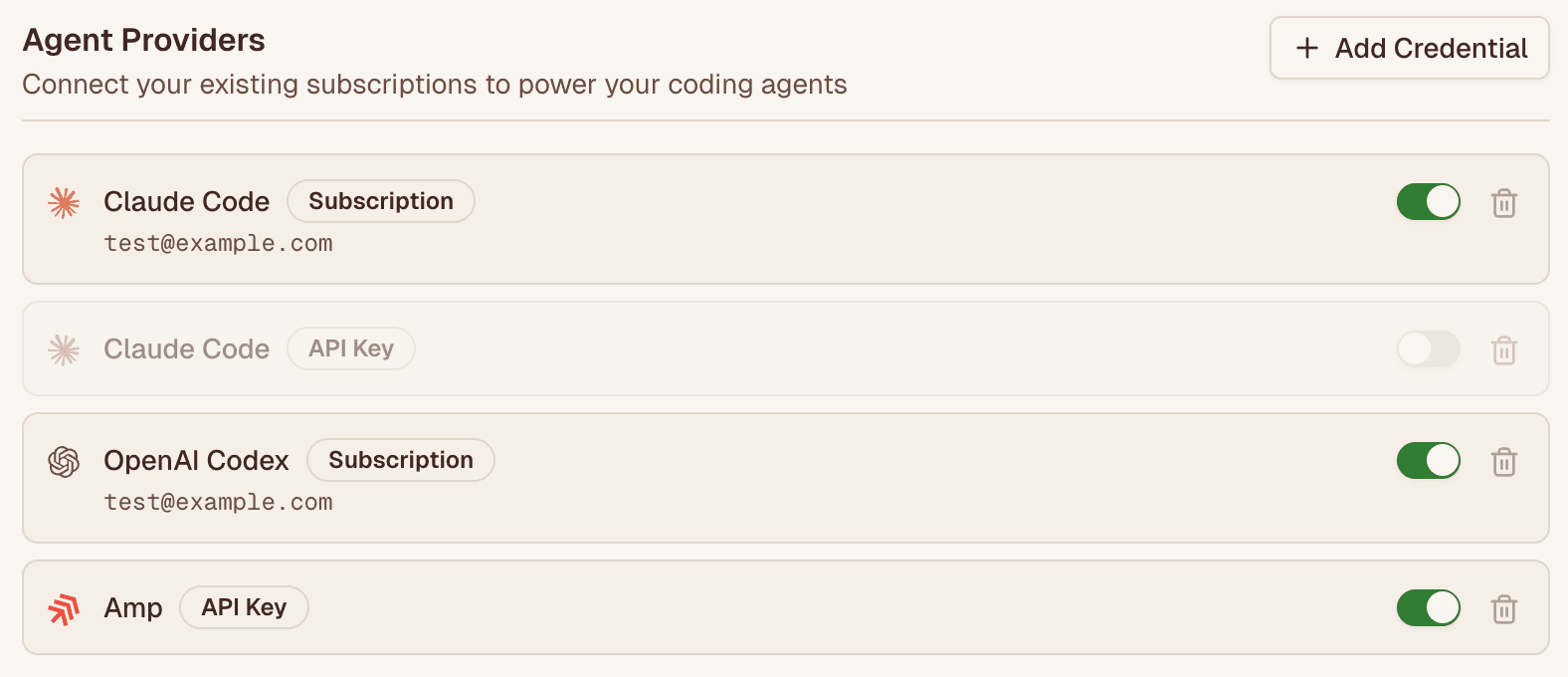
- Connect multiple credentials for the same agent: You can now connect multiple API keys or subscriptions for each agent provider, allowing you to easily switch between them. Each connected credential is distinguished by the email associated with it.
In early access:
- Branch creation toggle: When creating a task, you can now decide whether to create a new branch for the task, or simply work on the existing branch. Access this from below all prompt boxes.

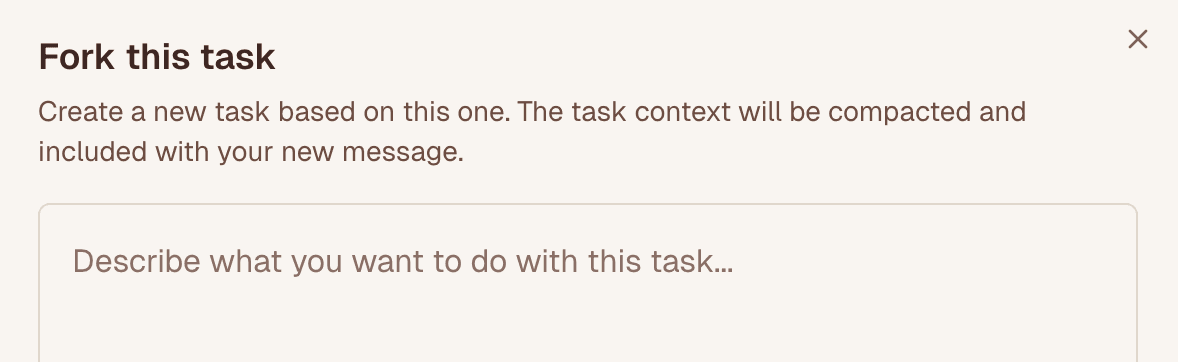
- Task forking: You can now fork a task by hovering over the last agent message and selecting the fork icon. When a task is forked, the original task's context is summarized and included as context for the new task.
- Forking a task is helpful if you want to explore multiple directions for a task in parallel, collaborate with multiple agents on different parts of a task (e.g., use GPT-5 to plan and Sonnet to implement, or Haiku to implement and GPT-5 to review, etc.), or if you just want to keep working after a task runs into an error.
- Tasks that were created from a fork will display a "Forked from …" banner with a deep link back to the original task.
- Dynamic model selection with GitHub mentions: When mentioning @n8v-io in GitHub issues or PRs, you can now specify which model to use for the task by including it in brackets, e.g.,
@n8v-io [model-name] your request here. Learn more.
UX Improvements & Bug Fixes
- Reliability improvements for Codex and Claude Code credentials handling.
- Bug fix for handling git diffs of file paths with spaces in them.
- Tweaked the sorting of tasks in the sidebar so they don't jump around as much if they are all "working".
November 7, 2025
Features
-
Global environment variables: You can now configure environment variables that apply to all of your connected repositories. Follow the updated environment variables guide to understand precedence and overrides.
-
Credit top-ups: You can now purchase AI credits to use for tasks. Credits are used when you don't have a provider account linked (eg. ChatGPT, Claude Subscription). These are useful if you want to try out different agents or continue working when you hit a rate limit with your linked provider.
- All users also now have $10 of free AI credits to use across any new or existing models and agents. Learn more about credit top-ups in the billing guide.
- Credits are sold at cost with no markup or fees so you pay exactly what the underlying AI provider charges.
-
OpenCode Agent: You can now use OpenCode as an agent with the following supported models: GLM 4.6, Kimi K2, Grok Code Fast 1, Qwen3 Coder 480B. These models provide a good balance between speed, quality and price, making them a great option for quick tasks or when you run into rate limits with other agents.
- A positive credit balance is required to use the OpenCode agent.
-
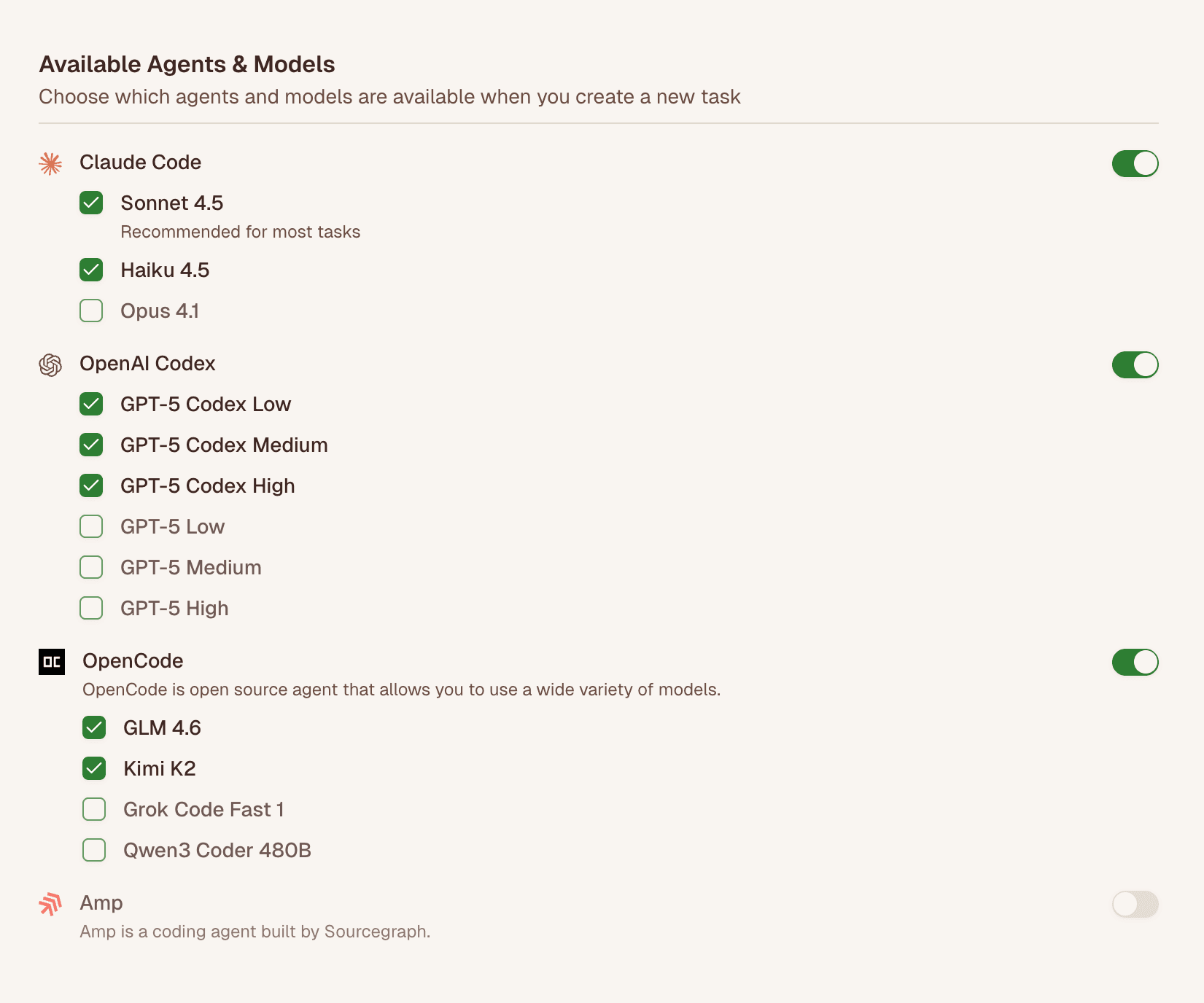
Configure available agents and models: You can now configure which available agents and models show up in the model selector in prompt boxes.
-
New features in early access:
-
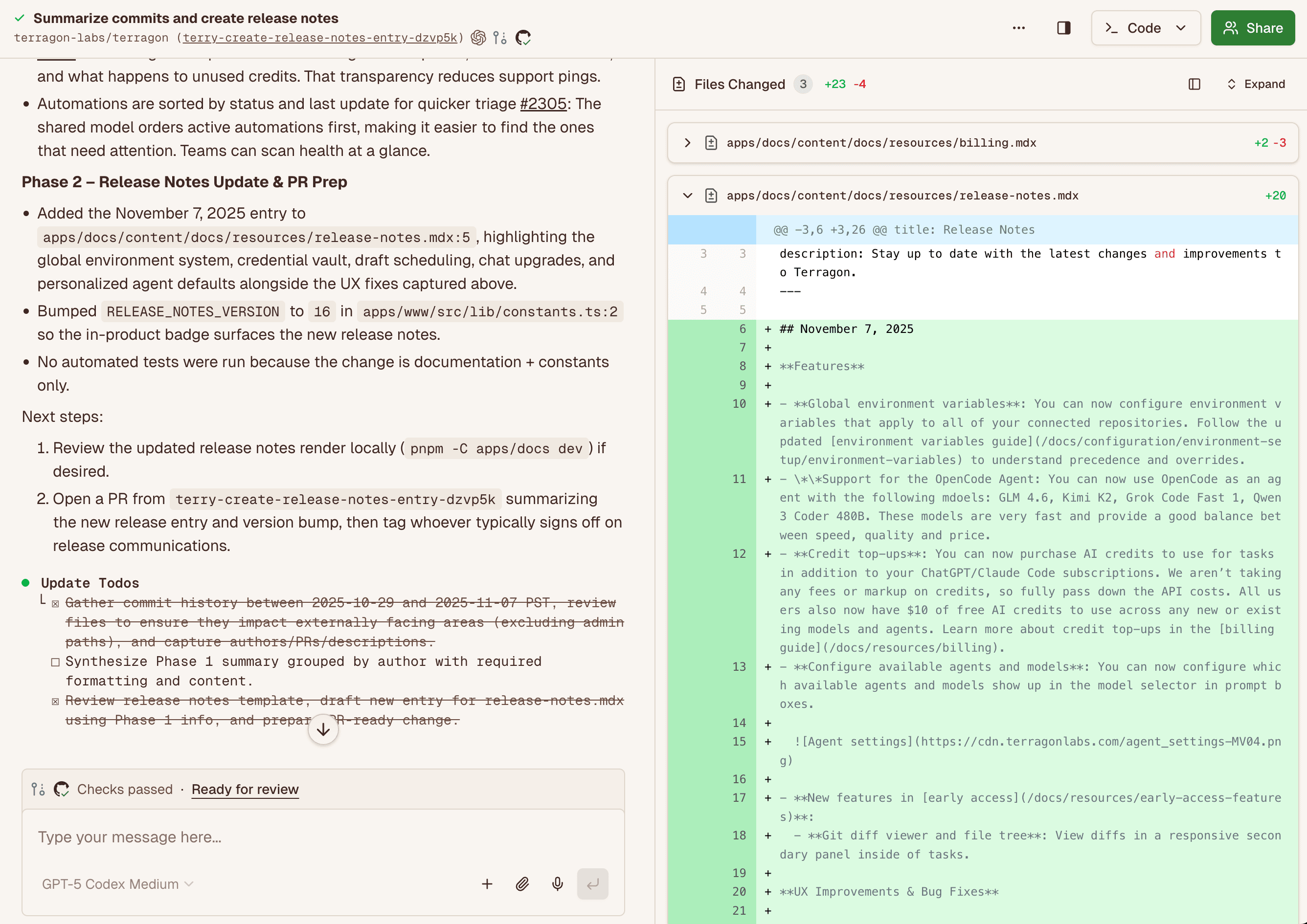
Git diff viewer and file tree: View diffs in a responsive secondary panel inside of tasks.
-
UX Improvements & Bug Fixes
- Draft tasks can now be scheduled when submitted.
- Diffs are now syntax highlighted for better readability.
- ANSI color codes are now rendered for bash tool call outputs.
- Automations are now sorted by enabled/disabled status and update time, so you active and most recently edited automations are always at the top for easy access.
- When the agent is done working, all thinking and tool calls are now collapsed unless they're the last message, improving readability during long runs.
- Added pagination to the task list to improve performance with large task lists
October 29, 2025
Features
- GitHub Mention Automation: Customize the behavior when @n8v-io is mentioned in GitHub by creating a "GitHub Mention" automation.
- Pro users can additionally have the automation trigger in response to mentions from bot users.
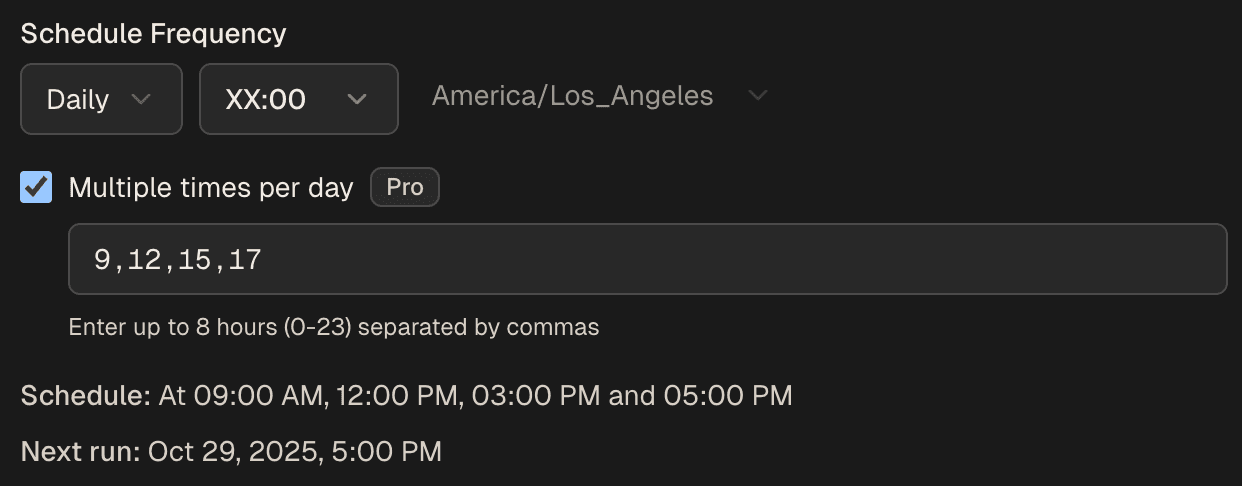
- Schedule Multi-Hour Automations: Pro users can now schedule automations that run at multiple hours on a given day. When creating an automation with a "Schedule" trigger, you can configure it to run at at 9am and 5pm, for example, instead of just once each day.
- Codex Rate Limit Queueing: When you hit a rate limit associated with your ChatGPT subscription, n8v automatically queues new tasks and messages until your rate limit resets. This behavior is similar to how we handle Claude rate limit errors and should help make it easier to continue working when you hit a rate limit.
Out of early access:
- Multi-Agent Mode: Run multiple AI agents from the same task. Available from the model selector in the prompt box.
- Sandbox Terminal: Open a terminal directly to the sandbox for debugging purposes. Available from the "..." menu at the top of tasks.
- Skip Setup Script: Skip running setup scripts when creating tasks. Available as a button below the prompt box.
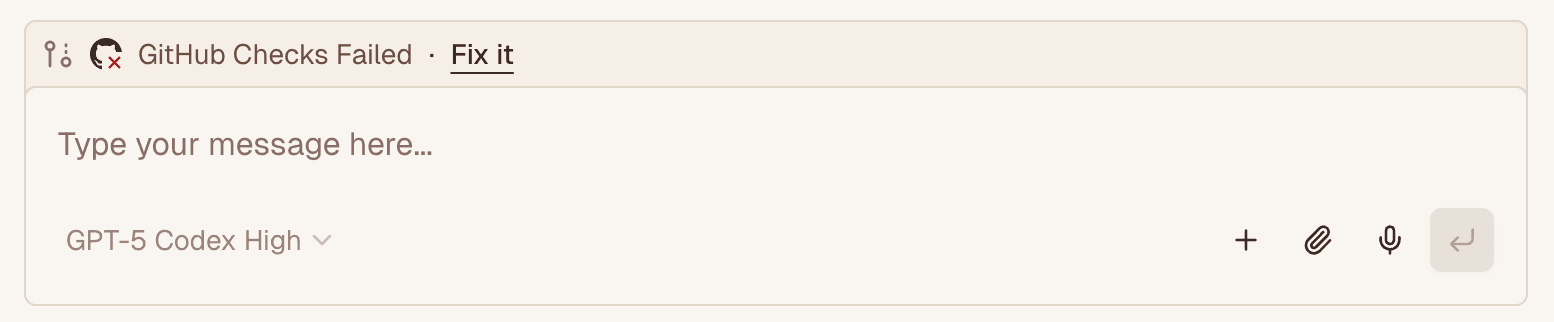
- GitHub Quick Actions: Certain quick actions are available above the prompt box when viewing tasks that have associated PRs, such as "Fix it" to automatically address CI failures and "Ready for review" to mark a draft PR as ready for review.
UX Improvements & Bug Fixes
- Tasks created from automations are now titled with the name of the automation for consistency and ease of scanning the task list.
- Sandbox script timeout errors are now reported even if the sandbox becomes unresponsive. Previously, tasks could hang indefinitely.
- Attachments and images are now persisted in the browser's local storage so they are not lost if you refresh the page.
- The task list is now collapsible when vieiwng a task. This should help reduce clutter and improve focus when viewing a task on smaller screens.
- Quickly duplicate an existing automation by clicking on the "Duplicate" button on the automations page.
- Easily toggle between Light and Dark mode from the sidebar. Accessible by clicking on your user avatar at the bottom of the sidebar.
October 15, 2025
- Haiku 4.5: n8v now supports Haiku 4.5 when using the Claude Code agent. Learn more about this new model here.
October 14, 2025
Features
- New features in early access:
- Multi-Agent Mode: Run multiple AI agents from one prompt. This is useful when you want to compare different approaches or if you're not sure if a specific model is the best fit for your task.
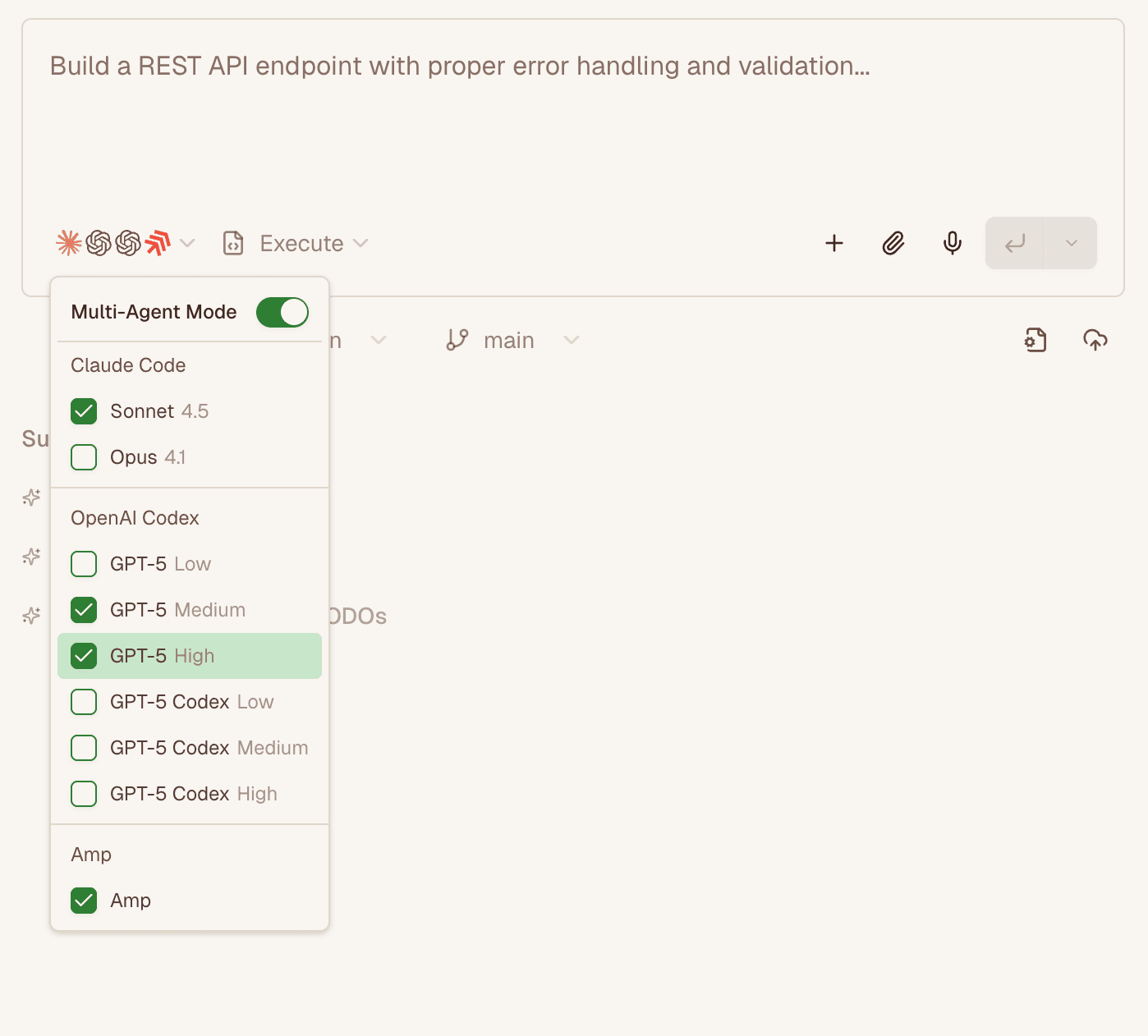
- Multi-Agent Mode: Run multiple AI agents from one prompt. This is useful when you want to compare different approaches or if you're not sure if a specific model is the best fit for your task.
- Agent Reliability: We revamped how we dispatch work to agents to make them more reliable. This should help reduce the number of errors related to tasks hanging on the "Waiting for assistant to start" step.
- Codex Reliability:
- We improved how we invoke the Codex agent to make it more reliable for long threads. This should help reduce the number of issues related to long Codex tasks not responding past a certain point.
- We changed how we handle ChatGPT subscriptions to make them more reliable and reduce the number of errors related to authentication failures when using the Codex agent.
UX Improvements & Bug Fixes
- Agent failures are now accompanied by any stderr output from the agent to make it easier to understand what went wrong.
- Devices now stay awake during audio recording to prevent them from going to sleep and interrupting the recording.
- The Slack integration now renders bot messages correctly when there are bot messages in the Slack thread.
- The model selector, plan-mode selector and add context menus are now responsive drawers on mobile for a better mobile experience.
- Improve the reliability of sandbox creation and resumption by adding more retries.
- Git Checkpoints now automatically expand when appropriate to show the changes made by the agent more clearly.
- Improved the prompt for the "Fix CI" button to tell the agent how to read the CI status using the
ghCLI.
October 7, 2025
Features
-
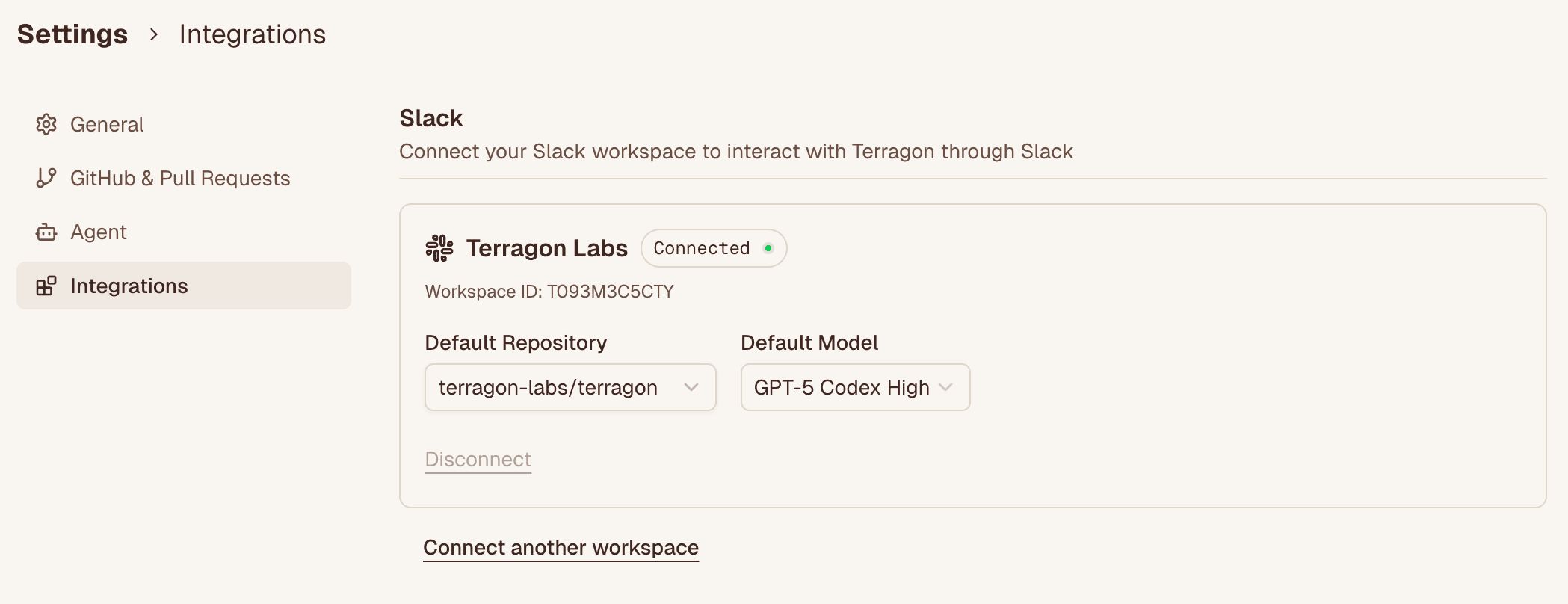
Slack Integration: Create tasks directly in Slack! Connect your Slack workspace from the new Integration Settings page, where you can also set a default repo and default model for tasks created from Slack. Check out the Slack integration documentation for setup instructions and usage examples.
-
Upload Text Files: You can now upload text files (e.g. .json, .md, .txt, .csv) in addition to PDFs and images when creating tasks. Drop files directly into the prompt box or click the paperclip icon to access.
-
Environment Management: You can now delete environments and their associated data after selecting an environment from the Environments page.
-
Quick GitHub Actions (Early access):
- For tasks with associated PRs, certain quick actions are available above the prompt box:
- PRs that have failing GitHub checks will have a "Fix it" button to automatically address CI failures.
- Draft PRs that have passing GitHub checks will have a "Ready for review" button to as ready.
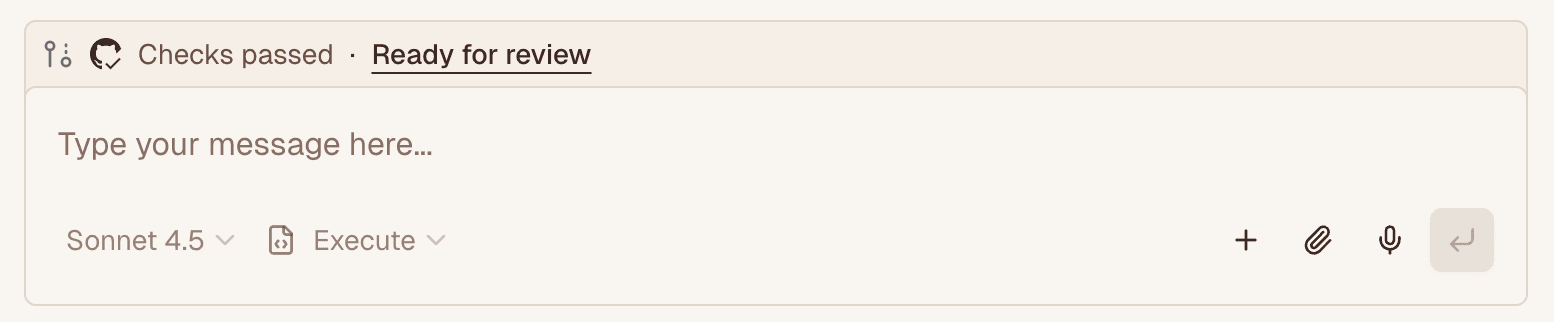
- PRs that have failing GitHub checks will have a "Fix it" button to automatically address CI failures.
- For tasks with associated PRs, certain quick actions are available above the prompt box:
-
Documentation Updates:
- New Slack integration guide with setup instructions and examples.
- New "When to use n8v" section to help understand ideal use cases
UX Improvements & Bug Fixes
- Tasks now correctly default to the last model used in the task.
- Press
escto stop running agents, providing quick control when tasks go off-track. - Fix GH_TOKEN to be overridable by environment-specific variables to support use cases where you need to expand the permissions provided to the
ghCLI. - Improve Amp agent handling when out of Amp credits.
- Bug fix to handle new format for Claude Code session rate-limit errors
- Model selector now opens a drawer for better mobile experience on smaller screens
- Fixed Codex agent not recognizing /clear and /compact slash commands
September 29, 2025
Features
- Amp Agent: n8v now supports Amp. Configure your Amp API key in Settings to use this powerful alternative to Claude and Codex.
- Sonnet 4.5: n8v now supports Sonnet 4.5 when using the Claude Code agent.
- GitHub Integration Improvements:
- When you mention
@n8v-ioin a PR comment, we now include more context from the full comment thread - PRs created from GitHub issues now automatically include "#issueNumber" in their body, properly linking PRs to their corresponding issues
- You can now specify a default model for new tasks when @n8v-io is mentioned. Update this in Settings
- When you mention
- Disable Git Checkpointing (out of early access): You can now toggle git checkpointing when creating new tasks. You may want to disable git checkpointing if you're working alone and want to commit directly to the default branch, use 3rd party tools like Graphite, or otherwise have custom git workflows. Click the cloud icon under the prompt box on the Home page to toggle this setting.
- New features in early access:
- Skip Setup Script: New option to skip running setup scripts when creating tasks, useful for quick operations that don't require the full environment setup. Click the file icon under the prompt box on the Home page to toggle this setting.
- Sandbox Terminal: You can now open a terminal directly to the sandbox for debugging purposes. You can access this from the
...menu at the top of tasks.
UX Improvements & Bug Fixes
- You can now sort the task list by created time.
- You can now more easily retry a task by hovering over the first message in a task and clicking the retry icon
- When retrying a task, you can now choose to skip archiving the original task. This is useful for quickly retrying a task with a different model to compare the results.
- Settings page has been reorganized with better section grouping for easier access to configuration options.
- Fixed Unicode surrogate pair errors that could occur with certain characters in code.
- Branch names now include a unique hash to prevent conflicts when multiple tasks work on similar features.
- Resolved RTL text handling issues for file paths in diff views.
- Running the
terry pullCLI command now checks for uncommitted changes before switching branches - Sidebar wordmark now links to dashboard for easier navigation
- Improved tool call and thinking message display especially for Codex. These are now collapsed by default unless they're the latest message.
September 10, 2025
Features
-
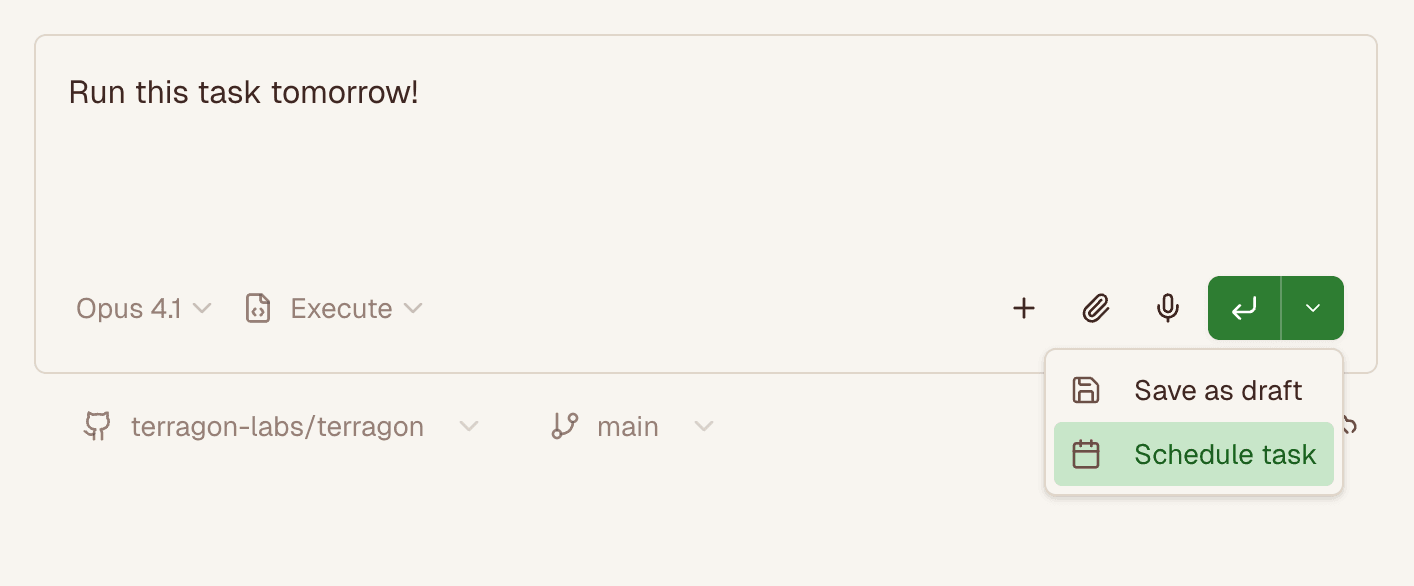
Schedule individual tasks: You can now schedule individual tasks to run at a specific time in the future from the prompt box. Note: If you want to run a task on a recurring schedule, do so from the Automations page.
-
GitHub issue and pull request automation triggers: Automations can now be triggered when GitHub issues and pull requests are created or updated in a repository. Helpful for automatically triaging new GitHub issues, creating tasks to implement a GitHub issue, or doing custom code reviews on pull requests. Accessible from the Automations page. Check out our docs for example prompts.
-
Group tasks by repository: You can now group tasks by their repository or their last updated time in the task list
UX Improvements & Bug Fixes
- Improved task reliability by automatically restarting the agent if unresponsive
- We now display the email address of the connected Claude account, to help you verify which Claude account is connected in the event you have multiple subscriptions
- Improved legibility of agent messages by collapsing thinking messages and individual tool calls by default
- External links from agent messages now open in new tabs for improved navigation
- Improved onboarding flow with better progress indicators, default repository and model selection
- Tasks now display the agent used and the model selected for each message to make it easier to context switch between agents and models. Icons at the top of tasks display which agent was used, and you can hover over messages to see which model was used.
- Queued "/compact" and "/clear" messages now work as expected
September 4, 2025
Features
- Documentation updates:
- Added comprehensive git checkpointing documentation
- Added example setup scripts for Go, using a custom Node.js version, Ruby, Java, and Swift
- Branch name prefix customization: You can now customize the branch prefix added to n8v-generated branches (defaults to
n8v/). Update this in Settings. - Codex Agent Improvements: MCP tool calls and errors are now rendered and surfaced in the task output
- Support for Claude Teams and Enterprise: You can now use Claude Teams and Claude Enterprise subscriptions in n8v
- n8v Sandbox Environment Variable: Added
N8Venvironment variable to sandbox environments so you can distinguish when the agent is running in an n8v sandbox versus elsewhere. - Setup Script Editor Improvements: The setup script editor now streams output in real-time so you'll see live feedback as you test changes. Access this by clicking on one of your environments from the Environments page.
UX Improvements & Bug Fixes
- Fixed
dockersupport in sandbox environments. There was an issue with our sandbox provider that prevented docker from working correctly. - Fixed page load performance when loading n8v.online. There were some cases of very slow connections, which are now resolved.
- Fixed the Claude rate limit message parsing to support the new Claude Code format
- You can now manually run "Scheduled" automations from the automations page to test them more easily
- When you reference a file, we now automatically scroll the list so your selection is always visible
- When a user archives a task, we only close the associated pull request if the user is the author of the pull request
- We now default to the Codex model if you only have OpenAI credentials connected
- Archiving tasks now automatically redirects to the Home page
- Queued messages are now displayed with a max height so they don't block other messages when viewing a task
August 28, 2025
Features
- GPT-5 reasoning variants: Added support for Low, Medium, and High reasoning variants when using the GPT-5 model
- Context usage display: Context usage is now displayed within tasks above the prompt box
- Improved task list UI (out of early access): Your task list is now always accessible from the sidebar when you're on the Home page or when viewing tasks.
- Plan Mode for Claude Code (out of early access): You can now use Claude Code's plan mode when creating new tasks. When a task is created in plan mode, Claude will provide a detailed implementation plan for you to approve or edit before any changes are made. To enable plan mode, in the prompt box change the mode selector in the bottom left to "Plan".
- Edit GitHub action workflows: n8v can now create and edit GitHub Action workflows in your repository
- CLI Enhancements:
- Added new
--modelflag for the CLIcreatecommand so you can specify which AI model to use when creating tasks - Added new
--modeflag for the CLIcreatecommand so you can specify whether to create tasks in plan or execution mode (Claude Code only)
- Added new
UX Improvements & Bug Fixes
- Improved shell environment: The agent now runs inside a Bash shell environment where the
~/.bashrcfile is automatically sourced. If you install tools, SDKs, or other dependencies that rely on ~/.bashrc (for example, updating your PATH to include a new binary), the agent will pick them up automatically. This should make it easier to use tooling like nvm and pyenv. - Increased sandbox and setup script timeouts to 15 minutes (previously 5 minutes)
- Added WebSearch and WebFetch as allowed tools in plan mode (Claude Code only)
- Fixed redirect after retrying tasks
- Fixed overflow UI issues in agent settings
- Fixed page flickering issue on Home page
- Improved landing page layout and visual hierarchy
- In early access:
- Git checkpointing can now be controlled when creating new tasks instead of being an environment setting. Click the cloud icon under the prompt box on the Home page to toggle this setting.
August 15, 2025
Features
- Increased Automation Limits: You can now create up to 20 automations (previously 5) to support more complex workflows
- MCP Support in Codex: You can now use MCP servers with the Codex agent
- New features in early access:
- Plan Mode for Claude Code: You can now use Claude Code's plan mode when creating new tasks. When a task is created in plan mode, Claude will provide a detailed implementation plan for you to approve or edit before any changes are made. To enable plan mode, in the prompt box change the mode selector in the bottom left to "Plan".
- Suggested Task Pills: Manual automations now appear as suggested tasks below the prompt box
- Disable Automatic Git Checkpointing: New environment setting to turn off automatic git checkpointing and branch protections that prevent pushing to the default branch. This is useful when you want to set up your own custom git workflows. You can change this setting for each of your repositories on the Environments page.
- Updated tasks creation behavior: Tasks now open automatically after creation
UX Improvements & Bug Fixes
- Fixed text and code block overflow issues in thinking messages from the agent
- Setup script output now displays properly when testing a script
- Improved error handling when creating new tasks with clearer error messages
- Codex can now use the
ghcommand to interact with GitHub
August 12, 2025
Features
- Connect your ChatGPT subscription to use with Codex: You can now use an existing ChatGPT subscription to power the Codex agent instead of providing an OpenAI API key. Just go to Settings and navigate to the ChatGPT Account section. If you already have an OpenAI API key connected, you'll need to disconnect that first if you want to connect your ChatGPT subscription.
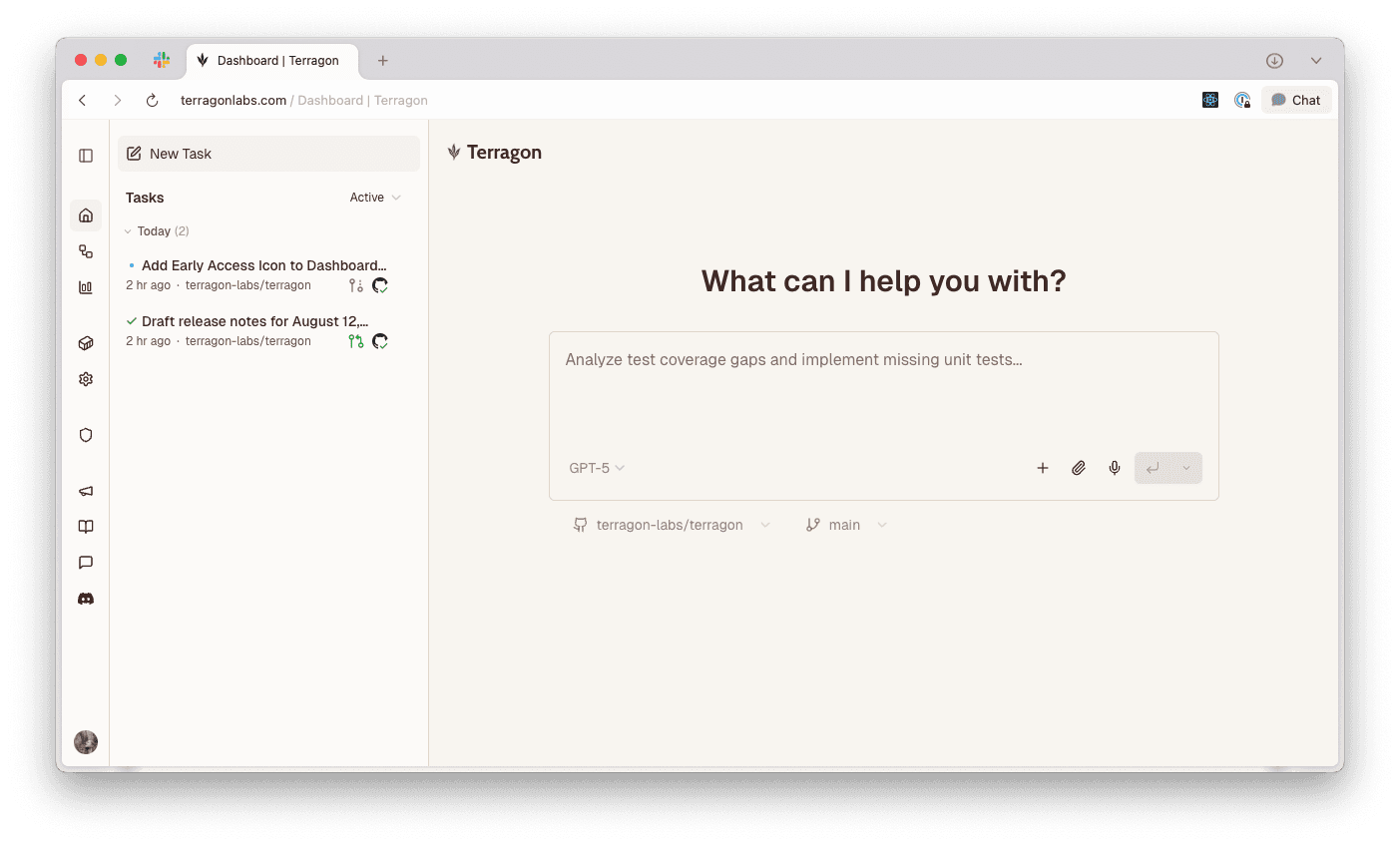
- Early access program: You can now opt into an early access program to try out new features as they're being developed and before they're released to everyone. Now in early access: an improved UI where your task list is always accessible from the sidebar when you're on the Home page or viewing tasks.
UX Improvements
- Settings are now grouped into thematic sections for easier navigation
- Simplified the "Create pull request button" in the Code menu inside of tasks to better reflect user settings
- New and improved landing page
Bug Fixes
- Fixed a bug where Claude would hang if a
/compactcommand was queued - Fixed a bug where Codex would hang if it ran a command that never terminated
- Fixed a bug where Codex didn't respect custom system prompts, available in Settings
- Resolved issue where you couldn't select Codex as an agent if you had a Claude Pro subscription
- Git conflict resolution now works in Codex rather than prompting you to login
August 7, 2025
Features
- GPT-5 Model Support: You can now select GPT-5 when using the Codex agent.
- PDF Support: Upload and preview PDF files when creating tasks, either via drag and drop or by clicking the paperclip icon in the prompt box.
- Support for SSE MCP servers: You can now use SSE-based MCP servers, in addition to the previously supported command-based and HTTP-based MCP servers. Add and update MCP configurations from Environments
- New Tools in Sandboxes: Sandboxes now have
ripgreppre-installed.
UX Improvements
- Model Selector Improvements: Revamped the model selector to include explicit model versions for Claude Code models, and improve visual hierarchy when choosing between multiple agents.
- New Collapsed State for the Sidebar: The collapsed state of the sidebar now shows icons and tooltips for each page of the app, so you can quickly navigate between pages while keeping the sidebar collapsed.
Bug Fixes
- Improved error handling when using the Codex agent
- Fixes instances where n8v wasn't willing to use
ghcommands to interact with GitHub
August 5, 2025
Features
- OpenAI Codex Agent: Introducing support for OpenAI's Codex as an alternative agent. Configure your OpenAI API key in Settings then select from the Codex mini, o4 mini, o3, or o3 Pro models in the model selector.
- Opus 4.1: Selecting Opus in the model selector now uses Opus 4.1
- Environment-Specific Setup Scripts: You can now define a setup script from Environments without committing a
n8v-setup.shfile to your repository. Environment scripts take precedence over those defined inn8v-setup.shfiles. - New Github Integration Settings:
- Control whether GitHub @mentions in PRs are added to existing threads or create new tasks
- Control whether PRs are opened as 'Draft' or 'Ready for review'
- New tools in Sandboxes: Sandboxes now have
jqanduvpre-installed
UX Improvements
- Improved Subagent Support: When you use Claude Code subagents, we now show the name of the subagent and the agent's color for improved confirmation the subagent is working as expected
- Diff Context in GitHub mentions: Mentioning @n8v-io in GitHub PR comments now includes context of the diff in the message back to n8v
- Clarified Task Sharing Permissions: The "Anyone with the link" permission was updated to "Logged in users with the link" to accurately reflect the actual behavior
- Additional Context in Push Notifications: Push notifications now include the task name for improved context
- Improved Setup Script Timeout Handling: We extended the setup script timeout to 5 minutes and now show the output of the script and which commands ran if it times out
- Improved GitHub Code Citations: Code citations in agent messages now link to the relevant file in GitHub for improved understanding
Bug Fixes
- Fixed UTF-8 encoding issues when pushing git commits with special characters
- Improved handling of tool call completions in various message scenarios
- Fixed notification display for tasks when browser tab is inactive
- Enhanced dynamic slash command loading states in the prompt box
- Stale tabs will now reload automatically
- n8v now has permission to clone multiple repositories in a single sandbox
July 25, 2025
Features
- Automations: Create tasks that run on a schedule or via manual trigger, accessible from the new "Automations" page
- Draft tasks: Save tasks as drafts to submit later, accessible from the segmented submit button in the prompt box
- Retry tasks: You can now retry tasks if you want to start over with the original prompt, or edit it before trying again. Retrying a task archives the original task after you submit, and is accessible from the new "Retry" option in the submenu within a task.
- Automatic context window management: When a task is close to the context window limit, we'll automatically compact the message history while preserving context. You'll see a warning when you're approaching the limit and indication that we'll automatically compact soon.
- Updated Node version in the sandbox: Node.js v22 is now the default version in the sandbox due to stability issues with v24. If your project requires Node v24, you can update your
n8v-setup.shfile to use it. - Notifications: You can now receive notifications when your tasks are complete. Enable this in settings, and make sure you have browser notifications turned on.
- Claude Code 1.0.60: We've upgraded to the latest version of Claude Code, which includes support for custom agents.
- MCP server: You can now use the terry cli as an MCP server. Run
claude mcp add terry -- terry mcpto add it to Claude Code.- This allows you to manage, create, and switch tasks all from within Claude Code locally.
UX Improvements & Bug Fixes
- Fixed a race condition that would cause the sandbox to hibernate while still running.
- On mobile, tap the top of a task to scroll to top
- On mobile, dismissing drawers is now more reliable
- Fixed a bug where HTML was incorrectly stripped from prompts
- Fixed a bug where formatting of pasted text broke if you entered new lines
- Fixed a timezone bug on the stats page that was attributing stats to incorrect days
- Repository selector can now be opened while still loading repositories
- Added status monitoring for Anthropic with automatic banner display during outages
- Archiving tasks now automatically redirects to the dashboard
- Fixed a bug where out of memory errors in the sandbox would result in core dumps
- Fixed a bug where queuing messages would result in errors if your Claude rate limit was hit
- Manual API key entry with
terry authfor cases where automatic authentication fails.
July 21, 2025
Features
- Collapsible sections in task list: Sections in the task list (Today, Yesterday, This Week, Older) can now be collapsed/expanded with state persistence across page loads.
- Task and PR Stats: You can now see your task creation and PR stats on the stats page.
- Task renaming improvements: You can now rename tasks directly in the list view.
- Rust & Cargo support: Rust development environment now pre-installed in all sandboxes.
- Improved repository cloning performance: Cloning repositories is now much faster.
- Anthropic downtime banner: In-product banner is now shown when Anthropic is having service outages
- UI affordances for file mentions and slash commands: You can now add file references and slash commands from the new
+button in the promptbox, in addition to typing@and/directly in the promptbox.
UX Improvements & Bug Fixes
- Fixed various horizontal overflow issues with long strings
- Fixed task renaming on mobile devices by removing unwanted zoom on input focus
- You can now tap outside of drawers and modals on mobile to dismiss them
- Fixed multi-line paste behavior in the promptbox. Newlines are now handled correctly.
- Prevent race condition when retrying a task multiple times after an error
- Improved previews of images attached to messages. We now show the full size image where possible.
- Fixed handling of large git changes without hanging.
- Improve sandbox reliability for long running tasks.
- Fix handling of timezones on the stats page.
- Set up scripts now support default branches other than
main
July 15, 2025
Features
- Usage Statistics: Track your Claude and Sandbox usage
- Task Sharing: Share your tasks with your collaborators:
- Viewers see a read-only version with task owner information.
- Tasks default to being visible to all repository members
- You can change sharing permissions via the share modal on a task or in Settings
- Claude rate limit handling: We now automatically queue and retry tasks if you hit your rate limit
- New
terry listCLI command: View all tasks for the current repository
UX Improvements
- Copy anchor links to specific task messages
- Improved message text wrapping in task view
- Better grid layout consistency in task list view
Bug Fixes
- Fixed git commit and push to fix race conditions where PRs failed to create
- Fixed race condition in task queue processing
- Fixed task status transitions for better reliability
- Improved error handling in the agent
July 11, 2025
Features
- Anyone can signup: n8v is free to use while in beta.
- Revamped docs: Much more comprehensive docs on how to use n8v
- Improved GitHub integration: n8v now automatically reacts with 👀 emoji when mentioned in GitHub comments
- Bring your own API key: For enterprise/non-claude subscribers, you can now manually enter an Anthropic API key.
- Upload your .env files: You can now quickly setup your environments from a .env file by pasting the contents of an existing .env.
Bug Fixes
- Fixed image removal button visibility on mobile devices
- Git diffs now properly respect base branches
- Consecutive user messages in the case of errors and queued follow ups are now delimited properly with newlines
July 9, 2025
Features
- Sandbox: We've upgraded the sandbox to use Ubuntu 24.04 and now have PHP and Composer installed
- GitHub CI status: See the CI status of your pull requests alongside your tasks
- Progressive Web App support: You can now add n8v to your home screen for faster access on mobile
- Updated PR titles and descriptions: We now automatically update these when the agent makes follow up code changes
- Task renaming: You can now manually rename your tasks
- Slash command suggestions: Type
/to see available slash commands for the agent. You can use most of the slash commands available in Claude Code today. - Invite your team: You can now generate access codes to invite your friends to try out n8v
UX Improvements
- Copy buttons for messages and code blocks
- Floating scroll-to-bottom button for quick navigation
Cmd+EnterandCtrl+Enternow submit messages (useShift+Enterfor newlines)- Faster
@-mention suggestions - Improved sandbox boot times for quicker responses
Bug Fixes
- Fixed
Enterkey not submitting messages properly - PRs now correctly use the selected base branch
- Branches no longer push when there are no changes
- Fixed repository selector showing empty list until page refresh
July 2, 2025
Features
- Custom system prompts: Configure custom system prompt in Settings.
- New task creation command in cli: Use
terry createto create new tasks directly from the CLI with GitHub repository integration - Open in Claude:
terry pull --resumenow opens a conversation in Claude locally after syncing the code
Quality of Life
- Enhanced mobile experience: Improved task header and scroll behavior on mobile devices, especially iOS Safari
- New UI design: Refreshed interface with better visual indicators and cleaner layout
- Improved navigation: Faster client-side navigation when accessing task pages
- Fixed UI flickering issues when using feature flags and themes
June 30, 2025
Alpha Release
- Run multiple coding agents simultaneously in isolated sandboxes
- Agents open PRs for you with their work
- Mention
@n8v-ioin GitHub comments to spawn new tasks - Use the
terrycli to continue working with the agent locally