Quota
How n8v reads your Claude, OpenAI and Grok subscription quota, shows it on the Quota page, and lets you or an assistant switch accounts, layer by layer
When you connect more than one subscription, three questions come up: how much is left on each, which one your chats are using, and what happens when one runs out. Quota answers all three in one place. It shows every subscription's allowance and resets, lets you make another one the active account, lets chosen accounts take over by themselves when a limit is hit, and keeps a trail of everything that happened.
The same data and the same controls are available in the web app, the iOS app, the REST API and MCP.
The Quota page appears in the sidebar when it is on for your account. Switching accounts and auto-switch have their own switches; see Feature flags for what each one turns on.
- 1
Readings
Each provider reports use per window: 5 hours, a week, and a model family's own. n8v keeps one reading per subscription and treats an old one as updating.
- 2
Rules
One set of rules, in one place, decides health, the headroom ranking, the models each account serves and what a switch does to your chats.
- 3
Controls
Three changes: which account is active, which accounts may take over at a limit, and which model new chats start on.
- 4
Surfaces
The Quota page, the iOS app, the REST API and MCP read the same rules and call the same controls.
- 5
Record
Every change and every limit n8v sees is written to your activity log, with where it happened.
What providers tell n8v
Claude usage
5-hour, weekly and model windows
ChatGPT usage
5-hour and weekly windows
Grok billing
credits and usage
Limit messages
from your own chats, when a provider refuses a turn
Inside n8v
Readings
cached per subscription, refreshed on request
Rules
health, headroom ranking, models, switch impact
Controls
switch, auto-switch, default model: one write path
Record
activity log, kept 90 days
Where you see and steer it
Quota page
web, with labels as you named them
iOS app
native API, bearer token
REST API
API key, private labels
MCP
assistants, private labels
Plan ahead
Planning is being rolled out per account with quotaPlanning, off by default. It also requires the existing quota permissions. Administrators can enable it at /internal/admin/feature-flags.
The web Quota page adds a Plan section for each provider. It shows billing renewal, recent pace, and allowance likely to go unused before its reported reset. Amber highlights at least 25% remaining or projected unused within 72 hours on a window longer than a day. Hover or tap for the exact date and calculation.
Use Set renewal date for a subscription whose provider gives no date. Enter any one billing date and choose weekly, monthly or yearly. n8v repeats that date, keeping the original day and using the last day of shorter months. You can edit or clear an entered date.
Billing renewal and quota reset are separate. A weekly allowance can reset on a different day from your payment. n8v uses the provider's reset time for expiry; entering a billing date never invents a quota reset. Claude documents independent weekly reset times, and OpenAI explains that quota resets can change without changing billing dates.
| Provider | Renewal evidence available to n8v |
|---|---|
| Claude | The usage endpoint reports quota resets. Its profile has a subscription creation date, which is not a current renewal date. Enter billing renewal yourself. |
| OpenAI | The Codex usage endpoint reports quota resets. If a stored ID token includes paid-period start/end claims, n8v reads them; many tokens omit these. Otherwise enter billing renewal yourself. An expired claim is not rolled forward. |
| Grok | The billing response can include currentPeriod.start/end or billingPeriodStart/End and billingCycle. Missing dates remain unknown. |
Pace comes from n8v's stored provider readings, measured in percentage points per hour. The response includes 24-hour and 7-day lookbacks with the hours actually observed. These readings can include usage outside n8v. There is no historical backfill: rates need at least two readings an hour apart. A lookback needs three observed hours before it drives a forecast; otherwise n8v uses the current window's average, when its start can be established. A gap across a reset is marked as a lower bound and does not drive a forecast.
A forecast is an estimate at unchanged pace. When pace is unknown, the plan reports today's remaining allowance with basis: remaining, not a predicted loss. Missing quota stays unknown. Readings older than three minutes never qualify as confirmed room.
Ask an assistant
subscriptions stays the compact current view. quota_plan returns the forward view, with private numbered labels, room now, expiring allowance, blocks and ranked model/account choices. Pass intent (coding, creative, video or general) for one ranking, or omit it for all four. Provider refreshes have an eight-second budget; a slow provider falls back to a dated cached reading.
For example, with fresh readings showing 100% of an OpenAI week unused and a reset in two days:
ChatGPT/Codex #2 has 100% left. At the observed pace, about 100% would go unused at the weekly reset in two days. It has room for a new coding task. Switch to this subscription first if it is not active.
With limits per model on, both tools also return usageWindows per subscription, every window with its scope (shared, or one model family), and quota_plan adds families: per Claude model, which subscription has what left, which window that number is from, and what blocks. A subscription's own "left" percentage (headroomPct) is a shared window; a recommendation for a model also counts a window the provider reports for that model.
If only the billing date is known, the answer names that renewal and says quota expiry is unknown. Model recommendations account for shared and model-family limits. Without measured capability data, they use your default and the model picker's order; they do not claim an intent-specific benchmark ranking.
set_renewal records a billing date, for example {"subscription":"Claude #2","renews_at":"2026-11-14","period":"month"}. Dates without a time use midnight UTC. Pass renews_at: null to clear it. The equivalent API routes are documented under Quota planning.
Planning is available on the web, REST and MCP. The native iOS quota contract is unchanged.
Forecast and purchase advice
The forecast is rolled out per account with quotaForecast, off by default, on top of quotaPlanning. It adds a Forecast section to the top of the Quota page, a forecast field to quota_plan, and a plan picker per subscription in Settings, Agent.
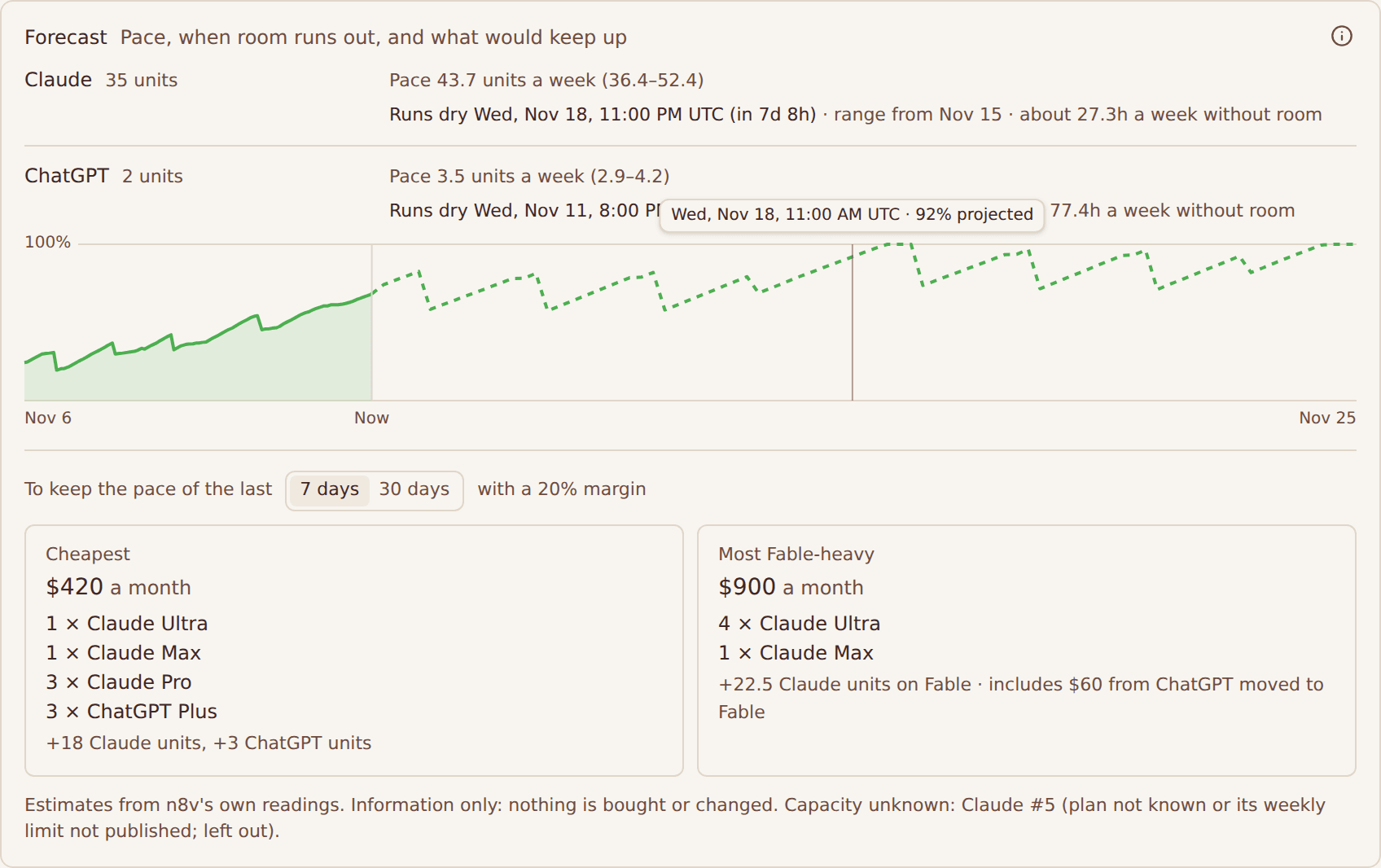
- Plan per subscription. Each subscription's plan comes from the provider (Claude's organization and rate-limit tier, ChatGPT's plan, Grok's tier) or from your choice in Settings, Agent; yours wins. A plan from n8v's plan catalog carries its price, its weekly capacity in units of the provider's base paid plan (Claude Pro, ChatGPT Plus, Google AI Pro, SuperGrok = 1), how much of it may run on Fable, and a source with the date it was read. A limit the provider does not publish stays unknown: such a subscription is named under Capacity unknown and left out of every number, never filled in.
- Pace. Per subscription and per provider, a line through n8v's own readings over the last 7 and 30 days (readings are kept 35 days). Hours while every subscription of a provider sat at its limit are left out, so the pace is the pace while room was left. A provider at its limit throughout is named as short by an amount not yet measurable. Exponential growth is used only once five covered days show a significant trend, and a weekly pattern only once fourteen covered days include every weekday twice; until then the assumptions say why not.
- Runs dry. Hour by hour over 30 days at the forecast pace, each window refilling at its own reset and use drawing from the window that resets soonest. Each provider shows when it first has no room, how many hours a week it would go without, and a range: the same simulation at the low and high end of the pace (two standard errors of the fit, never narrower than the margin either side). The chart shows the share of all capacity in use, weighted by plan price: readings solid, the pace ahead dashed.
- Purchase advice. How many extra subscriptions of which plan keep the 7-day or 30-day pace with a safety margin (20% by default), at what monthly cost. Cheapest is the lowest-cost mix of buyable plans per provider. Most Fable-heavy runs every missing unit on Fable and moves other providers' shortfall to Fable at equal spend, since n8v cannot measure an exchange rate between providers. Units of different providers are never added together.
The advice is information only: nothing on this page buys, upgrades or switches anything. The i button lists every assumption behind the numbers. Ask an assistant with quota_plan and an optional margin in percent, for example {"margin": 30}; the answer ends with the forecast in a few plain lines. Choosing a plan is recorded in the activity trail as limit.plan_set.
How it works, layer by layer
1. Readings
n8v asks each provider how much of a subscription is used, and keeps the answer as a reading.
| Provider | What the reading holds |
|---|---|
| Claude | A 5-hour window, a weekly window every model shares, and weekly windows for a model family such as Opus or Sonnet |
| OpenAI (Codex) | A 5-hour window and a weekly window, plus a family window for some models, such as Spark |
| Grok | The usage the provider reports; shown on the page, but a Grok subscription cannot take part in auto-switch |
| API keys | Nothing. Keys and compatible providers bill per request and have no subscription limits; they are listed under Usage based |
How fresh a reading is:
- The account you are using is read at most once a minute. An account you are not using is read at most every 15 minutes, because it only changes when it is used elsewhere.
- The page asks again every minute and when you return to the tab. Refresh reads every subscription again, at most once every 30 seconds per account.
- A reading older than 3 minutes is shown as Updating. It is never treated as proof that an account has room, and it ranks behind every account with a fresh reading.
- A window whose reset time has passed shows 0% and reads "reset, refreshing" until the provider's next reading confirms it.
A second source outranks the readings: limit messages. When a chat runs into a provider's usage limit, n8v remembers that account as limited until the reset the provider named. When the provider named none, n8v holds the account for an hour and then lets it be tried again; otherwise the hold lasts from one minute to eight days. A limit message is ground truth, so it wins over a reading that may be a minute old.
2. Rules
One set of rules decides the following, and the page, the apps, the API and MCP all read it. A change to a rule changes it everywhere at once.
- Health. One verdict per account: Available, Limit reached, Updating, Needs re-login or Not reported.
- Headroom. What is left on the account's hottest window: 100 minus the highest use among the windows that apply. The page ranks without a model, so only the windows every model shares count. When n8v picks a replacement for a chat, it ranks for that chat's model, so a model's own family window counts too.
- Ranking. Accounts with a known, fresh headroom come first, most headroom first. Then accounts with a known but old reading. Then accounts whose headroom is unknown. Exact ties are broken the same way every time: the account in use first, then by name.
- Models served. The models of the provider that your account may use and that need no extra sign-in. Effort variants share their base model's limits, so the list shows the base model. The window that limits a model on an account is the hottest of the shared windows and the model's own family window.
- Combined total. With two or more reporting subscriptions, the provider header adds one total, weighted by plan size as the provider publishes it. A plan n8v does not know counts every subscription the same, and the tooltip says so.
| Provider | Plan weights |
|---|---|
| Claude | Pro 1x, Max 5x counts 5x, Max 20x counts 20x |
| OpenAI | Plus 1x, Pro Lite 5x, Pro 20x |
3. Controls
There are three changes, and each has one implementation behind every surface.
| Change | What it does | When it applies |
|---|---|---|
| Active account | Makes one subscription the account every chat of its provider uses | Each chat's next message |
| Auto-switch | Lets a subscription take over by itself when another of its provider hits a limit | At the next limit |
| Default model | Sets the model new chats start on | New chats; running chats keep their own model |
4. Surfaces
| Surface | Reads | Changes | Names accounts as | Access |
|---|---|---|---|---|
| Web app | The Quota page | All three | The account's own name, as the app always did | Your sign-in |
| iOS app | The same, through the native API | All three | The account's own name | Your sign-in |
| REST API | GET /api/v1/subscriptions | All three | A private label such as Claude #2 | An API key, scopes chats:read and chats:message |
| MCP | The subscriptions tool | All three | A private label such as Claude #2 | The same key and scopes |
5. The record
Every change and every limit n8v sees is written to your activity log, with where it happened. The activity trail lists what is recorded.
The Quota page
- 1Provider header. The provider, how many subscriptions, how many chats a switch would touch (running, waiting on a limit), and one combined total across all of them, weighted by plan size.
- 2Name and health dot. The account's name as you know it, its plan, and one dot for its health: green, amber, red or grey.
- 3Badges. Active marks the account your chats use. Best marks the one with the most headroom when it is not already in use. A health pill appears when the account is not available.
- 4Meters. The 5-hour session and the shared weekly window: use so far, a bar with a tick at your warning level, and a countdown to the reset. Any other window above your warning level shows as a chip.
- 5Auto-switch. Opt this subscription in or out of taking over when another one hits a limit. Next #n is its place in line.
- 6Use. Make this the active account. It is disabled while the account is at a limit and hidden while it needs a new sign-in.
- 7Details. Every window with its reset, every model with the window that limits it and a Make default button, the health verdict, the plan's weight in the combined total and the account's recent events.
- 8Default model. The model new chats start on, shown on the provider that serves it. Account-wide, not per provider.
- 9Fallback line. Who takes over, in order, when the active account hits a limit, and who is held out until a reset.
- 10Recent activity. Limits hit, switches and settings changes, from every surface, with where each was done.
A few details the schematic leaves out:
- Order. Subscriptions are ranked as in Rules: the account with the most headroom first.
- Warning level. Meters turn amber at your warning level, 75% unless you changed it in Settings, and red at 100%. The tick on each bar marks the level.
- A hidden window. A window other than the two shown, above your warning level, appears as a chip on the row so it never hides behind the fold.
- Windows by scope. With limits per model on, a subscription's details list every window with its scope: Shared windows count every model, and each Claude model has a row that says whether n8v has seen its own limit reached. Claude reports no usage per model for these accounts, so a model's row never shows a made-up percentage.
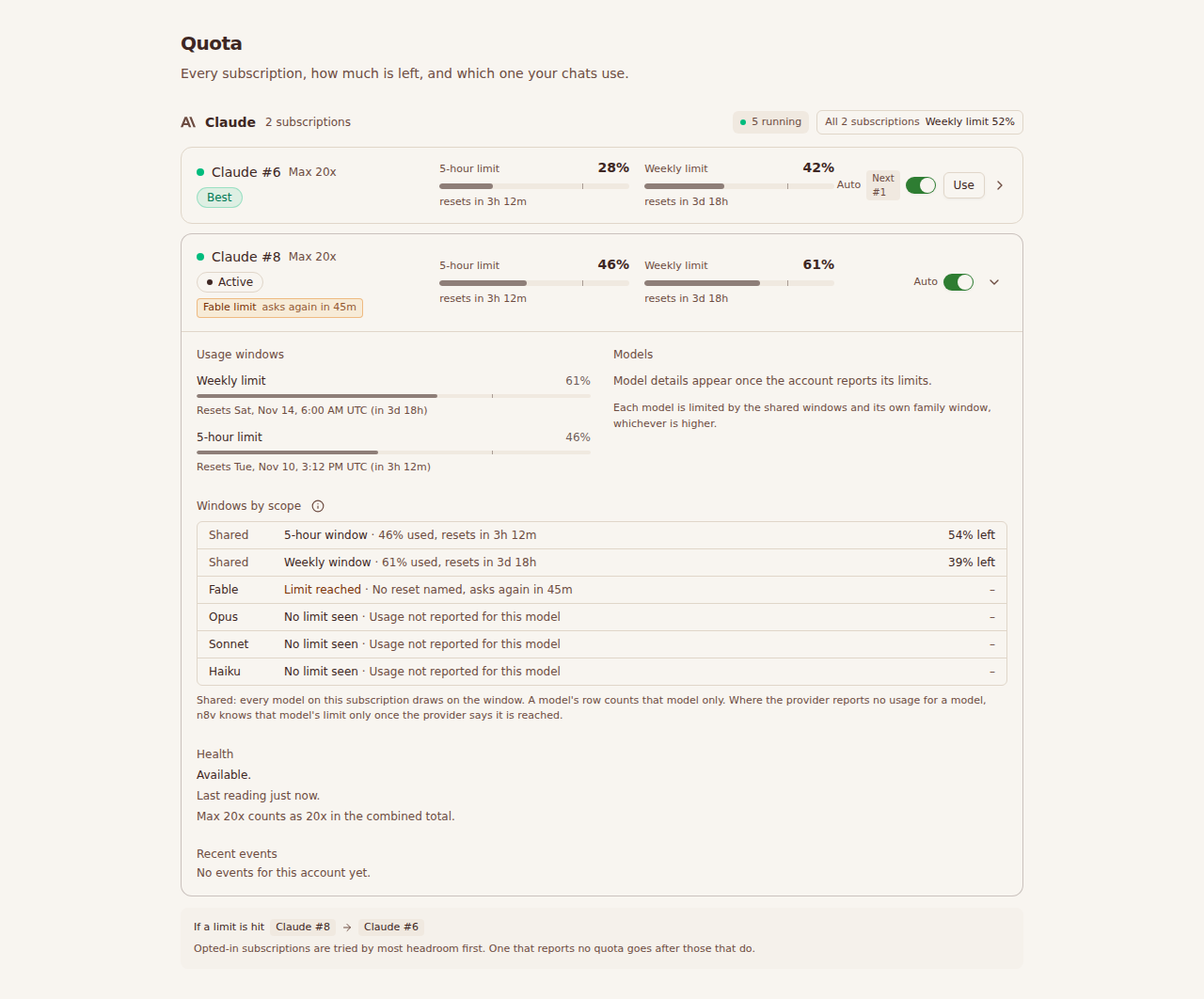
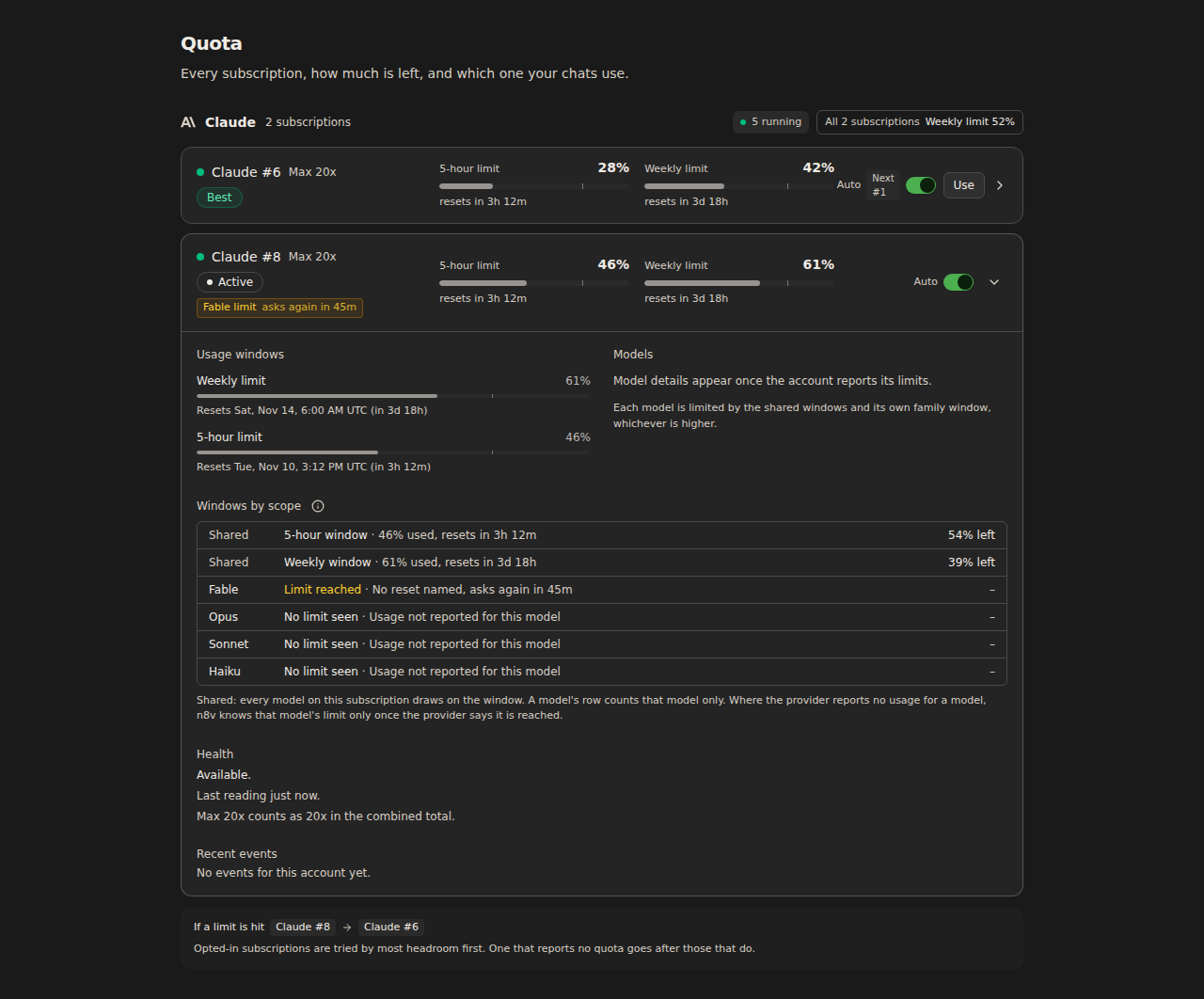
- Usage based. API keys and compatible providers appear at the bottom as Active or Inactive. They have no limits to show.
- Without a control. With switching off, rows have no Use button. With auto-switch off, they have no toggle and the provider has no fallback line. With the default model off, the provider has no model picker.
- Nothing connected. The page offers Connect a subscription, or Add an API key when subscription sign-in is off for your account.
Switch the active subscription
- 1
Press Use
YouPage
With chats running or waiting on a limit, a confirmation first says what happens to them. With none, the switch happens at once.
- 2
Update optimistically
PagePage
The row shows Active before the server answers. If the server refuses, the page puts everything back.
- 3
Ask the server
PageServer
It checks that the switcher is on for your account and that the account is one of your own subscriptions.
- 4
Write under a lock
ServerDatabase
In one transaction it locks the provider's credential rows in a fixed order, clears the others and sets this one. Two switches at once queue, so exactly one account is active.
- 5
Record it
ServerActivity log
After it answers, the server writes a limit.activate row with the old account, the new one and where it was done. It never delays or fails the switch.
- 6
Answer with the old account
ServerPage
A toast says Claude now uses the account, with Undo. Undo is another switch back, recorded as its own event. Your other open apps update at once.
- 7
Chats pick it up
PageYour chats
Each chat uses the new account from its next message. A chat in the middle of a turn finishes it on the old one.
Switching is account-wide per provider: every chat of that provider uses the new account from its next message. What happens to chats already in flight:
| A chat that is | What happens |
|---|---|
| In the middle of a turn | Finishes the turn on the old account, and uses the new one from its next message |
| Idle | Uses the new account the next time you send a message |
| Waiting on a limit | Continues when you next message it or retry it. n8v's own scheduled retry at the reset also runs |
| Started after the switch | Uses the new account |
The page counts the first and third rows before you confirm: "2 running, 1 waiting on a limit". With none in flight, the switch applies at once; with some, a confirmation says what happens first. Either way Undo puts the previous account back, when there was one.
The page disables Use for an account at its limit and hides it for one
that needs a new sign-in. The API and MCP do not apply that rule: they switch
to any of your own subscriptions. Read the account's health first.
Health states
Every account has exactly one of five states. The same words appear on the page, in the iOS app, and in the health field of the API and MCP.
- 1
Did the provider reject the sign-in?
Needs re-login
- 2
Does the provider report no limits for it?
Not reported
- 3
Is a limit message in force, or does a fresh reading show 100%?
Limit reached
- 4
Is the last reading older than 3 minutes?
Updating
- 5
None of the above
Available
| State and label | Dot | Caused by | What to do |
|---|---|---|---|
ok, Available | Green | No limit message in force, no fresh reading at 100%, and a reading under 3 minutes old | Nothing |
limited, Limit reached | Red | A limit message from the provider is in force, or a fresh reading shows a shared window at 100%. The detail reads "Resets in 2h 14m", or "Reset time not reported" | Wait for the reset, or use another account. Use is disabled until then |
stale, Updating | Amber | The last reading is older than 3 minutes. The page keeps showing it, dimmed | Nothing, or Refresh. An account you are not using is read less often, so it can show this between readings |
relogin, Needs re-login | Red | The provider rejected or revoked the sign-in | Sign in again in Settings, Agent. With subscription sign-in off, use an API key. Use is hidden |
unavailable, Not reported | Grey | The provider reports no limits for the account right now, so n8v cannot say how much is left | Try Refresh. The account may still work; it ranks last |
Two rules worth knowing:
- An old reading is never Limit reached on its own. Only a limit message from the provider can mark an account limited while its reading is old.
- A limit message with no reset time marks the account limited until it is tried again, about an hour. The page then says "Reset time not reported".
Auto-switch
With auto-switch, a subscription you opted in can take over when another of its provider hits a limit, so a chat continues instead of waiting for a reset.
- Who can opt in. Claude and OpenAI subscriptions. Grok subscriptions and API keys cannot.
- When it moves. Only when the account the chat was running on is itself opted in, and only to another opted-in account of the same provider. It never moves to an account that did not opt in. If you or another chat already moved the provider on, a chat follows an opted-in choice and otherwise stays: it never overrides a manual switch.
- Who is tried, in what order. Opted-in accounts ranked by headroom for the chat's model, as in Rules.
- Who is held out. An account with a limit message in force, one whose fresh reading is at 100% (until that window resets), and one that needs a new sign-in. A limited account is never switched to again before its reset, so the chat cannot loop.
- What the chat shows. A note, "Claude limit reached on Claude #1. Continuing on Claude #2.", and a queued Continue message.
- If nobody has room. Nothing moves. The chat waits on a limit until the earliest reset known across the opted-in accounts and the limit that was hit, and is retried then. If that retry meets a limit again, the same rules run again.
A worked example with three Claude subscriptions, all opted in:
14:00Everything has room
- Claude #1Max 20x62% / 40%ActiveHeadroom 38
- Claude #2Max 5x10% / 30%Best, next #1, headroom 70
- Claude #3Pro80% / 20%Next #2, headroom 20
If a limit is hit: #1, then #2, then #3. The order is most headroom first, where headroom is 100 minus the hottest window.
14:20A chat on Claude #1 meets its limit, resetting at 16:40
- Claude #1Max 20x100% / 40%Held outHeld out until 16:40
- Claude #2Max 5x15% / 31%ActiveHeadroom 69
- Claude #3Pro80% / 20%Next #1, headroom 20
n8v remembers the limit until 16:40, picks the opted-in account with the most headroom (#2), makes it active, notes it in the chat and sends Continue.
15:10Claude #2 meets its limit, resetting at 19:30
- Claude #1Max 20x100% / 40%Held outHeld out until 16:40
- Claude #2Max 5x100% / 36%Held outHeld out until 19:30
- Claude #3Pro80% / 20%ActiveHeadroom 20
#1 is held out, so #3 is the only account with room. The chat continues there.
15:50Claude #3 meets its limit, resetting at 20:15
- Claude #1Max 20x100% / 40%Held outHeld out until 16:40
- Claude #2Max 5x100% / 36%Held outHeld out until 19:30
- Claude #3Pro100% / 24%Held outHeld out until 20:15
Nobody has room, so nothing moves. The chat waits on a limit until the earliest reset, 16:40, and is retried then. The page says so: no other opted-in subscription has room, chats wait for the first reset.
The fallback line under each provider shows the order as it would run right now, and Held out until reset names the accounts it skips. Opt an account in or out with the toggle on its row, or with the API and MCP calls below.
A Claude task run by an organization is handled by the organization: it moves within the organization's own subscriptions, or ends so the organization can continue it. It never changes your active account.
At a limit
Being rolled out per account with limitRecovery, off by default. It refines auto-switch and the cross-provider fallback; without them it changes nothing.
- Your provider first. A chat that hits a limit moves to another opted-in subscription of the same provider that has room, whether or not the one it ran on was opted in. If you made another account active meanwhile, the chat follows it.
- Never an account you did not opt in. If the only subscription with room has auto-switch off, the chat says so ("Claude #6 has room, but auto-switch is off for it") and the Quota page shows it with Turn on auto-switch. n8v does not take it for you.
- A fallback only where there is room. Before a chat continues on another provider, n8v reads that provider's quota. A subscription at its limit is not a target.
- A wait, not an error. With nowhere to go, the chat waits for the first reset any subscription named, or one hour when none did, and continues by itself.
- Home as soon as there is room. A chat on a fallback returns to its own model at its next turn once its provider has room, and a waiting chat continues at once when you switch or opt in a subscription.
- A new subscription takes over by default. A Claude or OpenAI subscription you connect has auto-switch on from the start, and chats waiting on that provider continue on it at once: as many as your account runs at a time, the rest as turns end. Turn auto-switch off for it on the Quota page if it should not take over.
- A waiting chat follows the room, not the account it ran on. Every ten minutes n8v checks the chats that wait at a limit. If a subscription of that provider has room, they continue on it; if none has, they wait for the first reset among your subscriptions, not for the reset of the account they last ran on.
- Never a subscription you turned off. A turned-off subscription is not moved onto, not offered and not waited for. Turn it on again and chats waiting on that provider continue at once if it has room.
- A pinned chat never moves. It waits for its own provider.
- Only where the model runs. Before a chat continues on another subscription, n8v checks that the account can run the model: a ChatGPT sign-in's own model list, and any refusal the provider gave before. An account whose plan does not include the model is skipped. If a provider still refuses the model, the chat goes back to its own model, or waits for it; it does not end in an error.
- The limit that binds. An account at a limit names the window that is full and when it resets. When the provider refuses without naming a reset and no window it reports is full, the page says so: the limit is on one model or on usage credits.
- Before it happens. When the active subscription is projected to reach its limit within the hour and no opted-in subscription has room, the Quota page says so, with the subscription that could take over. This needs
quotaPlanningas well.
Every move is in the activity trail. retry_chat with model continues a chat that stopped at a limit on the model you name.
Turn a subscription off
Turn off a subscription that keeps failing or should not be used, such as a free plan that cannot serve the model your chats run on, or a sign-in that keeps being refused. It stays connected and keeps its label, and you can turn it on again at any time.
- Off means out of everything. A turned-off subscription is never the active account, never switched to by auto-switch or by the cross-provider fallback, never handed back to by your API key in reserve, and never given to an organization run. n8v does not read its quota, so it causes no "Not reported" or stale rows, and it is not counted in the plan or its advice.
- Separate from auto-switch. Its auto-switch choice is kept for when you turn it on again. Turning on one that is already on changes nothing.
- Turning off the active one. Its provider moves at once to the next subscription that is on, in the order you connected them. With none left, that provider's chats cannot run until you turn one on or choose another account in Settings, Agent. Your API key is never made active for you.
- Chats on it. A turn already running finishes on it. The chat's next message runs on the provider's active account. A chat with a pinned model keeps its model and follows the account. An organization run that was given the subscription stops with a plain reason, and the organization goes on once another subscription has room.
- Where. Open a subscription's details on this page and switch Use off, or switch it off on its row in Settings, Agent. Turned-off subscriptions are listed apart under Turned off, each with a switch to turn it on again, even when a provider has none left on. Assistants use
set_subscription_enabled; REST usesPOST /subscriptions/enabled. - What assistants see.
subscriptionsandquota_planleave turned-off subscriptions out and name them in one line,disabled: ChatGPT/Codex #5, Claude #3. Passinclude_disabledto list them in full, with statusdisabled. Switching to one answers409 subscription_disableduntil it is turned on.
Your own API key in reserve
With keyReserve on, an Anthropic API key you add under Settings, Agent waits behind your Claude subscriptions. When no subscription that may take over has room, the chat continues on the key, on the same model, instead of waiting for a reset or moving to another provider. The chat says so: "Claude limit reached on Claude #1. Continuing on your Anthropic API key."
- Rule. In reserve (the default): used only while every subscription is at its limit, and handed back before a later turn once one has room. Always: every Claude chat runs on the key. Off: never picked. Turning the key on by hand sets Always; choosing a subscription by hand, or turning the key off, puts it back in reserve.
- Cap. A monthly amount in US dollars, $100 until you set your own; empty is no cap. The month is the calendar month in UTC. At the cap the key is not picked, and a key in use hands the account back to a subscription. The cap is checked before each turn: a turn in flight finishes, so it can be passed by one turn.
- What it costs. Every turn on the key is booked as the agent reported it. The key's row shows this month's total against the cap, and a chat shows what it spent on the key. A turn you stop sends no report and is not booked. Anthropic's invoice is what you pay.
- What it does not touch. OpenAI keys, compatible providers, enterprise workspaces, and organization runs on a subscription of their own. An organization run on your active account is capped and booked like any other chat, and never moves to the key by itself. The key takes over from any subscription, with auto-switch on or off; it hands back only to the subscription it took over from or one opted in to auto-switch, and never to one that needs a new sign-in.
Default model
The default model is the model a new chat starts on. It is one setting for your account, not one per provider: the page marks it on the provider that serves it, and shows "Not set for" the others.
- Set it from a provider's Default model menu, or with Make default next to a model in an account's details.
- It accepts models of Claude, OpenAI and Grok that your account may use and that need no extra sign-in. See Model access.
- It changes new chats only. A running chat keeps its model; change one chat with
update_chat.
The activity trail
Changes and limits are recorded as they happen, wherever they happen.
- Claude limit reached on Claude #1. Resets 2026-11-08T16:40:00.000Zn8v4m ago
- Claude limit reached on Claude #1. Continued on Claude #2n8v4m ago
- Claude moved from Claude #2 to Claude #3iOS1h ago
- Auto-switch on for Claude #3Assistant2h ago
- Default model set to Sonnet 5API3d ago
| Event | Recorded when | Written by |
|---|---|---|
| Limit reached | n8v sees a provider limit message on one of your accounts | n8v |
| Switched | An account is made active | You on the web or iOS, an API key, or an assistant |
| Switched automatically | A limit led n8v to continue on another opted-in account | n8v |
| Auto-switch changed | An account is opted in or out | You, an API key, or an assistant |
| Default model changed | The default model is set | You, an API key, or an assistant |
| Turned off or on | A subscription is turned off or on | You, an API key, or an assistant |
- Where it was done. Each row says: Web, iOS, Assistant (MCP), API or n8v.
- One row per limit. A limit that many chats run into is recorded once, while the account's limit message is in force.
- Names. The page and the iOS app name accounts as you do. REST and MCP use private labels.
- Kept for 90 days. Failed calls are not shown. The page lists the latest 30, and an account's details list its own five most recent.
- Same rows elsewhere. Changes made with an API key or in the iOS app also appear in Settings, API, Activity.
API, REST and MCP
Base URL https://n8v.online/api/v1. Reads need the chats:read scope, changes chats:message. Keys restricted to repositories are refused, because subscriptions belong to the whole account.
| Call | Scope | Body | Does |
|---|---|---|---|
GET /subscriptions | chats:read | Subscriptions, blocked chats and a control summary | |
GET /subscriptions/events | chats:read | limit in the query, 1 to 100, 20 by default | The trail, newest first |
POST /subscriptions/active | chats:message | {"subscription": "Claude #2"} | Makes it the active account of its provider |
POST /subscriptions/auto-switch | chats:message | {"subscription": "Claude #2", "enabled": true} | Opts it in or out |
POST /subscriptions/default-model | chats:message | {"model": "sonnet-5"} | Sets the default model |
POST /subscriptions/enabled | chats:message | {"subscription": "Claude #3", "enabled": false} | Turns it off or on |
curl -sS https://n8v.online/api/v1/subscriptions \
  -H "Authorization: Bearer $N8V_API_KEY"

curl -sS -X POST https://n8v.online/api/v1/subscriptions/active \
  -H "Authorization: Bearer $N8V_API_KEY" \
  -H "Content-Type: application/json" \
  -d '{"subscription": "Claude #2"}'
An excerpt of the read. Besides what Subscription quotas and alternatives lists, each subscription carries health, autoSwitch and models, and control carries the account-wide view:
{
  "subscriptions": [
    {
      "label": "Claude #2",
      "provider": "anthropic",
      "kind": "subscription",
      "selected": true,
      "status": "active",
      "availability": "available",
      "health": { "state": "ok", "label": "Available", "detail": null },
      "autoSwitch": { "eligible": true, "enabled": true, "rank": null },
      "models": [
        {
          "id": "sonnet-5",
          "usedPct": 48,
          "label": "Weekly",
          "resetsAt": "2026-11-13T06:00:00.000Z"
        }
      ]
    }
  ],
  "control": {
    "defaultModel": "sonnet-5",
    "providers": [
      {
        "provider": "anthropic",
        "models": [{ "id": "sonnet-5", "name": "Sonnet 5", "isDefault": true }],
        "impact": { "running": 2, "blocked": 1 },
        "fallback": ["Claude #1"],
        "waiting": [
          { "subscription": "Claude #3", "resetsAt": "2026-11-08T16:40:00.000Z" }
        ]
      }
    ]
  }
}
fallback is the order auto-switch would try opted-in accounts in, by label. waiting lists opted-in accounts held out until a reset. impact counts the chats a switch would touch. If the control view cannot be read, the quota fields still answer and health, autoSwitch and models are absent.
Answers to changes:
{ "subscription": "Claude #2", "active": true, "note": "Applies to all chats of this provider from their next message. A chat in the middle of a turn finishes it on the previous account." }
{ "subscription": "Claude #2", "auto_switch": true }
{ "default_model": "sonnet-5", "note": "New chats start on this model. Running chats keep theirs." }
{ "subscription": "Claude #1", "enabled": false, "active": "Claude #2", "note": "While off it is never used, switched or fallen back to, not read for quota and not counted in quota_plan. ..." }
active is the label of the account the provider uses after the change, or null when none is on.
| Status | Code | Meaning |
|---|---|---|
| 403 | subscriptions_disabled | The subscription overview is off for the account, in Settings, API |
| 403 | switching_disabled | Switching subscriptions is off for the account |
| 403 | auto_switch_disabled | Auto-switch is off for the account |
| 403 | subscription_enable_disabled | Turning subscriptions off and on is not enabled for the account |
| 409 | subscription_disabled | The subscription is turned off: turn it on before making it active |
| 403 | repo_not_allowed | The key is limited to repositories |
| 403 | forbidden_scope | The key lacks the scope the call needs |
| 404 | subscription_not_found | No subscription has that label. Read subscriptions for the current ones |
| 400 | invalid_request | A missing or malformed field, a subscription that cannot auto-switch (Grok, API keys), or a model the account cannot use |
See Errors for the rest.
The tools take the same scopes as the REST calls and return the same answers as tool results.
| Tool | Scope | Does |
|---|---|---|
subscriptions | chats:read | Subscriptions with quota windows, health, auto-switch and model limits, blocked chats and the fallback order |
switch_subscription | chats:message | Makes subscription the active account of its provider |
set_auto_switch | chats:message | Opts subscription in or out with enabled |
set_default_model | chats:message | Sets model, an id from list_models |
subscription_events | chats:read | The trail, with an optional limit from 1 to 100 |
set_fallback | chats:message | Cross-provider fallback: on, back, and the model claude, gpt and gemini chats continue on |
set_subscription_enabled | chats:message | Turns subscription off or on with enabled |
A subscription is named by its private label, as subscriptions lists it. The change tools are idempotent and never destructive: asking for what is already true changes nothing.
The iOS app uses https://n8v.online/api/client/v1 with the app's own sign-in as a bearer token. Its contract is published as OpenAPI at /api/client/v1/openapi.json. Integrations should prefer REST or MCP, which are covered by API keys and scopes.
| Call | Body | Needs |
|---|---|---|
GET /limits | providerQuotaUsage | |
POST /limits/active | {"credentialId": "..."} | providerQuotaUsage and subscriptionSwitcher |
POST /limits/auto-switch | {"credentialId": "...", "enabled": true} | providerQuotaUsage and subscriptionAutoContinue |
POST /limits/default-model | {"model": "sonnet-5"} | providerQuotaUsage |
GET /limits/events | limit in the query, 1 to 100, 20 by default | providerQuotaUsage |
The three changes answer with the refreshed overview, so the app can redraw in one step.
| Field | Meaning |
|---|---|
controls | Which of switch, autoSwitch and defaultModel the account has |
defaultModel | The account-wide default |
providers[].models | Models the provider serves for the account, with isDefault |
providers[].impact | Chats a switch would touch: running and blocked |
providers[].waiting | Opted-in accounts held out, with resetAt |
accounts[].health | state, label and detail |
accounts[].limitedUntil | The reset a limit message named, or null |
accounts[].autoSwitch | eligible, enabled and rank (1 is tried first, null is not in the line) |
accounts[].models | The window that limits each model: usedPct, label, resetsAt |
A flag that is off answers 403, an account that is not yours 404, and a subscription that cannot auto-switch or a model the account cannot use 400.
Privacy
- REST and MCP return no tokens, emails, credential ids, custom labels or provider URLs. Subscriptions are named by private labels, numbered per provider in the order they were connected:
Claude #1,Claude #2,ChatGPT/Codex #1. API keys of the provider count in the numbering, and removing an earlier credential renumbers the later ones. - The web app and the iOS app show the account's name, as the app always has.
- Every change, from every surface, is written to your activity log.
Feature flags
| Flag | Default | Turns on | Without it |
|---|---|---|---|
providerQuotaUsage | Off | The Quota page and its sidebar entry, the native reads, model-aware chat warnings; and the default model on the web and iOS | The page redirects to the dashboard, and the native limits calls answer 403 |
subscriptionQuota | On | The subscription overview, the trail and the default model over REST and MCP, and the base for every REST and MCP change; and the record of limits n8v sees | REST and MCP answer subscriptions_disabled. Limit messages are tracked only for auto-switch |
subscriptionSwitcher | Off | Switching the active account, on the web, iOS, REST and MCP, and the switcher in chats | No Use button; REST and MCP answer switching_disabled |
subscriptionEnable | Off | Turning a subscription off or on: the switches on the Quota page and in Settings, Agent, REST and MCP | Nothing can be turned off; REST and MCP answer subscription_enable_disabled. One turned off earlier stays off and can always be turned on again |
subscriptionAutoContinue | Off | Auto-switch: the toggles, the fallback line and the automatic switch itself | No toggles, and a chat at a limit waits for its reset as before; REST and MCP answer auto_switch_disabled |
limitRecovery | Off | At a limit: room on the same provider first, a fallback only onto room, a wait instead of an error, and the warnings on this page | A limit behaves as before: auto-switch between opted-in accounts, then the fallback or the wait |
modelFamilyLimits | Off | Limits per model: a limit on one Claude model holds out only that model on that subscription, with the rule for what its chats continue on | A model's limit holds out the whole subscription for an hour |
keyReserve | Off | Your own Anthropic API key as a metered reserve: the rule, the cap, booking of every turn on it, and the takeover at a limit | A key is the active account when added, is not booked and has no cap |
quotaForecast | Off | The forecast and purchase advice: the Forecast section, forecast in quota_plan, and the plan per subscription in Settings, Agent. Needs quotaPlanning | No forecast, no plan picker; quota_plan answers as before |
subscriptionSignIn | Off | Adding a Claude or ChatGPT subscription, and signing in again | Subscriptions already connected keep working: read, ranked and switched as usual. The page offers API keys instead of Sign in again |
subscriptionSignIn only decides whether a subscription can be added or
signed in again. It does not hide, disable or change a subscription that is
already connected.
Questions
Why does a chat I just switched still use the old account? It was in the middle of a turn. It finishes that turn on the old account and uses the new one from its next message.
Does switching change a chat's model? No. Switching changes the account, not the model. The default model only applies to new chats.
Why does an account show Updating? Its last reading is older than 3 minutes. An account you are not using is read at most every 15 minutes, so it can show this between readings. Refresh reads it again.
Why is no account marked Best? Best marks the freshly read account with the most headroom, and only when it is not already the active one. With only old readings, or when the active account already tops the list, nothing is marked.
Why did a chat wait for a reset when another subscription had room? That subscription is not opted in, the account the chat ran on is not opted in, or the other account is held out by its own limit.
Can an assistant switch my account? Yes, with a key that has the chats:message scope, through switch_subscription. It can only name your own subscriptions by label, and the change is recorded as Assistant or API.
Does n8v ever move a chat to an account I did not opt in? No.
How do I find a subscription's label? Read subscriptions or GET /api/v1/subscriptions. Labels follow the order the credentials were connected, so remove one and the later ones renumber.
Troubleshooting
| Symptom | Likely cause | Fix |
|---|---|---|
| No Quota in the sidebar, or the page redirects | providerQuotaUsage is off for the account | Ask for it to be turned on |
| "Provider limits could not be loaded" | The request failed. Credentials were not exposed | Try again |
| No Use button on a row | It is the active account, it needs re-login, or switching is off | Check the row's badges; see Feature flags |
| Use is greyed out | The account is at its limit | Wait for the reset in its tooltip |
| No auto-switch toggle, or it is disabled | The flag is off, or the account is a Grok subscription or an API key | Only Claude and OpenAI subscriptions can opt in |
| Every account shows Updating | Readings are older than 3 minutes, or a provider is slow | Refresh; if it persists, the provider's usage service may be down |
| Needs re-login | The provider revoked the sign-in | Sign in again in Settings, Agent, or use an API key if sign-in is off |
| No Recent activity, or it is empty | No control is on for the account, or nothing happened in the last 90 days | See Feature flags, or make a change and reload |
403 switching_disabled or auto_switch_disabled | The matching flag is off for the account | See Feature flags |
404 subscription_not_found | The label does not exist, often because an earlier credential was removed | Read subscriptions for the current labels |
403 repo_not_allowed | The key is limited to repositories | Use a key without repository restrictions |
Related: Model access for which models an account can run, the API for blocked chats and alternatives, and Claude Code and Codex for connecting a provider.
Artifacts
One place for what your assistants make, a page or a small package, versioned, opened in an isolated viewer and handed to your agents
Limits and fallback per model
A Claude subscription limits Fable, Opus, Sonnet and Haiku separately. How n8v keeps the other models running when one is out, and what a chat does next